OAuth 2.0 is the industry-standard protocol for authorization. OAuth 2.0 focuses on client developer simplicity while providing specific authorization flows for web applications, desktop applications, mobile phones, and living room devices.
While testing API , authentication mechanism is a crucial part to deal with and there are many ways of authenticate a service depending on the application and its requirements.
We will discuss few mostly used scenarios used with OAuth2.0.
We will use below website to create OAuth2 based test application and understand how it works, so that we will be able to test efficiently the authentication scenarios.
Website: http://coop.apps.symfonycasts.com/
1- Create a test application which implements Oauth2 using above url
- Sign up and create an application from API page as below:

2. Provide name,redirect url ( an invalid url, so that we will be able to see the URL)

It will crate an application along with below details:
- Client id
- client secret
3. Navigate to authentication tab and select the above created application. It will display all the details on how to access the api.

2. Understanding OAuth parameters
- client_id :
It is a unique id assigned to a client or application who wants to use the authentication service provider. It is a public identifier.
In this case, COOP is the Auth service provider and our Test application is a client who will use this Authentication. Similar scenarios is also seen in case of google or facebook. Many application has integrated google and facebook as a Oauth2 identity service. So all those application have unique id given by Google or facebook. - client_secret:
It is also a unique passcode provided to each client based on client_id. So client_id and client_secret both combined can have a unique identity of an application - grant_type:
In OAuth 2.0, the term “grant type” refers to the way an application gets an access token. There are several types of grant_type used.
The Authorization Code Grant Type is probably the most common of the OAuth 2.0 grant types that you’ll encounter. It is used by both web apps and native apps to get an access token after a user authorizes an app.
It differs from most of the other grant types by first requiring the app launch a browser to begin the flow. At a high level, the flow has the following steps:
– The application opens a browser to send the user to the OAuth server
– The user sees the authorization prompt and approves the app’s request
– The user is redirected back to the application with an authorization code in the query string
– The application exchanges the authorization code for an access token
More details in this article.
client_credentials:
The simplest of all of the OAuth 2.0 grants, this grant is suitable for machine-to-machine authentication where a specific user’s permission to access data is not required. It does not require any web browser action or any code.
redirect_url:
User will be redirected to this url on successful login.
More on OAuth2 here.
3. Lets see in action using postman
We will use Postman to generate OAuth2 token from above details shown in image.
- grant_type: authorization_code
Paste the URL in browser , it will redirect to login page and after user provides username and password it will ask for authorization as below image:
http://coop.apps.symfonycasts.com/authorize?client_id=TestApplication_avi&response_type=code&scope=eggs-count&redirect_uri=http://localhost.com

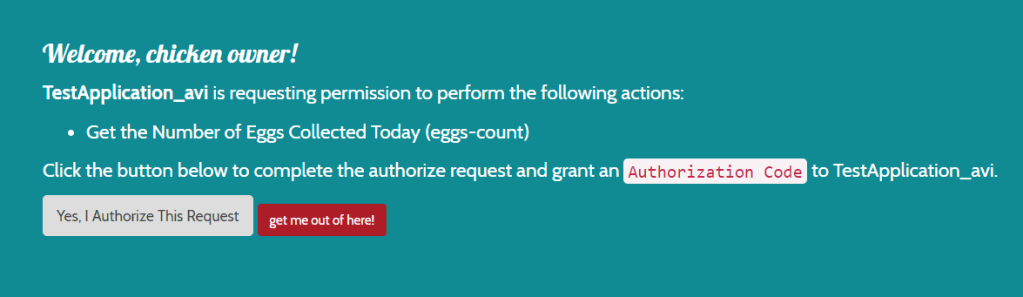
It shows the application name requesting permission and what permission. Once user authorizes, it will generate a code in url present in address bar.
- We can now use this code to generate access token
- POSTMAN cURL request: (import it as raw text in postman)
curl --location --request POST 'http://coop.apps.symfonycasts.com/token' \
--header 'charset: utf-8' \
--header 'Content-Type: application/x-www-form-urlencoded' \
--header 'Cookie: __cfduid=d7c80c980d3753d41846a2155bf6d658d1594820771; oauth_server=4ks4fmrpfvm878g7s28mcddr60' \
--data-urlencode 'client_id=Avishekapp1' \
--data-urlencode 'client_secret=xxxxxxxxxxxxxxxxx' \
--data-urlencode 'grant_type=authorization_code' \
--data-urlencode 'redirect_uri=http://localhost' \
--data-urlencode 'code=c9c4b6ab50c6ad2d5c6039ae708ea4f829a98847'
We will get token and other details like refresh token, scope and expiry time.
We can now test this token by calling Get profile endpoint.
Make a GET request with below details in postman:
GET: http://coop.apps.symfonycasts.com/api/me
Header:
Authorization:Bearer <use token received from above request>
It will give the user profile details from whom we got the code while authorization in browser.
Now that we know how to get code , token and get profile details we can automate the end to end flow.
Summary of the steps to be performed:
- Navigate to authorization url in browser to let the user authorize after login. We can achieve this via Selenium (Running selenium in headless mode)
System.setProperty("webdriver.chrome.silentOutput", "true");
        ChromeOptions options = new ChromeOptions();
        options.addArguments("--headless");
        options.addArguments("--disable-gpu");
        options.addArguments("window-size=1920,1080");
        options.setPageLoadStrategy(PageLoadStrategy.NORMAL);

        WebDriverManager.chromedriver().setup();
       driver = new ChromeDriver(options);

        String emailLocator="form-email";
        String pwdLocator="form-password";
        String loginLocator="//button[@class='btn btn-primary']";
        String authorizeBtnLocator="//a[@class='btn btn-default']";

WebDriver driver = getDriver();
        driver.get("http://coop.apps.symfonycasts.com/authorize?client_id=Avishekapp1&response_type=code&scope=profile&redirect_uri=http://localhost");
        driver.findElement(By.id(emailLocator)).sendKeys("email of the user who will authorize");
        driver.findElement(By.id(pwdLocator)).sendKeys("password of the user who will authorize");
        driver.findElement(By.xpath(loginLocator)).click();
        Thread.sleep(4000);
        driver.findElement(By.xpath(authorizeBtnLocator)).click();
        Thread.sleep(5000);
        String fullUrl= driver.getCurrentUrl();
2. After authorization code will be generated in browser url, we need to fetch the url via selenium and extract the code using String method
String code= fullUrl.substring(fullUrl.indexOf("code=")+5,fullUrl.indexOf("&"));
driver.quit();
3. Once we get the code, we can send the token request to get the access token. This can be achieved via Rest assured
         String token= given()
                .formParam("client_id", client_id)
                .formParam("client_secret", client_secret)
                .formParam("grant_type", "authorization_code")
                .formParam("code", code).log().all()
                .when()
                .post("http://coop.apps.symfonycasts.com/token")
                .then().log().all().extract().path("access_token");
4. Once we get the token we will pass the token in get profile endpoint to get the user profile details, this can also be achieved in rest assured.
          given()
                .header("Authorization","Bearer "+token)
                .when()
                .get("http://coop.apps.symfonycasts.com/token")
                .then().log().all();
References:
OAuth2 provider: http://coop.apps.symfonycasts.com/
OAuth2.0 : https://oauth.net/2/
Grant_type: https://developer.okta.com/blog/2018/04/10/oauth-authorization-code-grant-type

 TechieWolf