Posted in Automation Testing

[Automation Framework/Java] Git-Crypt: Safeguard your secrets

it’s very important to protect information from the World Wide Web because there are so many bad things can that happen with the negligence of our data.

In software engineering, having the data protected from the authorised axis is supercritical and hence similar concept applies in test automation as well.

While building a test automation framework, we should not ignore to protect the important information such as the username and password URL of our environment, API, keys, data, credentials and so on.

If this sensitive information is leaked to outside the world via a repository, then it can pose a big threat.

hence we should be very careful to enforce a very secret management system this is a very good script that comes to the rescue and it provides a super easy way to implement and I would like to talk about it. How to use it

so basically this is pretty easy to set up. We can follow the step-by-step information available in there to get positive to make it very simple. I would like to add a couple of steps that would help quickly set up it and then use it.

Here is the official and detailed documentation

Note: Before you proceed, ensure the below steps to be done

  • If your repository with credentials is already committed then you have already exposed them. Once you enforce git-crypt, make sure to change all credentials to remidiate.
  • If you are working on a new repository then ensure to do this setup first thing or an early action item so you don’t accidentally expose secrets by commits
# Install (chose the steps for linux as mentioned in doc)
brew install git-crypt

# init
cd repo
git-crypt init

# save secret key file
git-crypt export-key git-crypt-secret

# Specify files to encrypt by creating a .gitattributes file:
# to encrypt single file
secretfile filter=git-crypt diff=git-crypt
# to encrypt file with extension
*.key filter=git-crypt diff=git-crypt
# to encrypt whole directory
secretdir/** filter=git-crypt diff=git-crypt

# check status
git crypt status

# Common error
## *** WARNING: staged/committed version is NOT ENCRYPTED! ***
# To solve this, make some changes to those files and commit

# lock or encrypt file
git crypt lock

# unlock or decrypt file with secrete file
git crypt unlock git-crypt-secret

Lastly, make sure to keep the secrete file git-crypt-secret within the team or store in a password or secured space.
Posted in Manual Testing

gitmind.com : Copy link feature for sharing mindmap with password copies incorrect link

Bug description:
When user shares a mindmap with the option password, then clicks on copy button to copy the link to share , the link gets copied with incorrect details added to it.

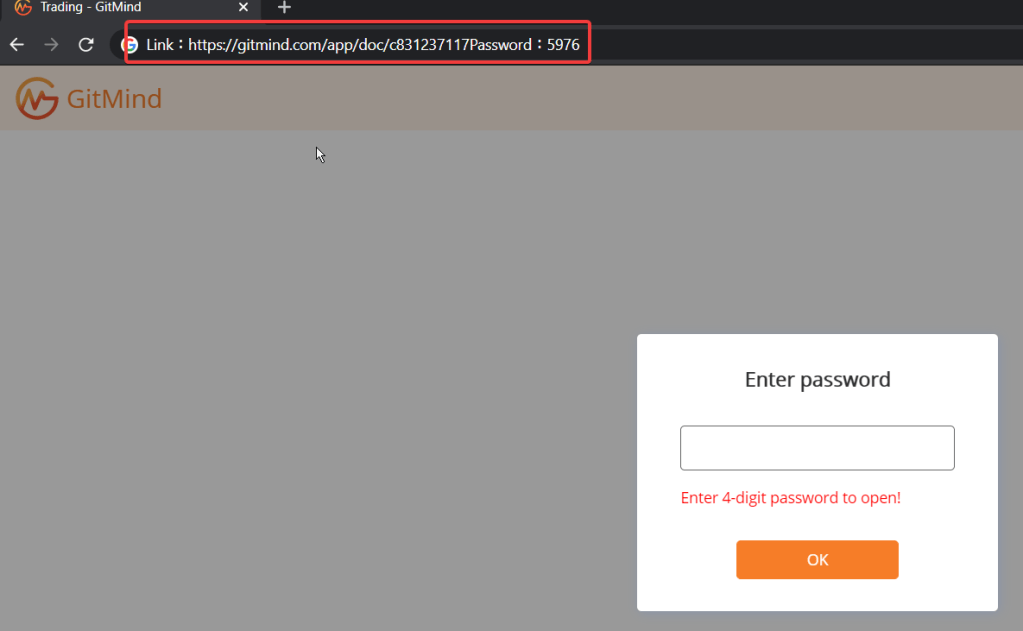
The URL is invalid as it adds a prefix “Link:” and a suffix Password: to it.
Example: Link:https://gitmind.com/app/doc/c831237117
Password:5976

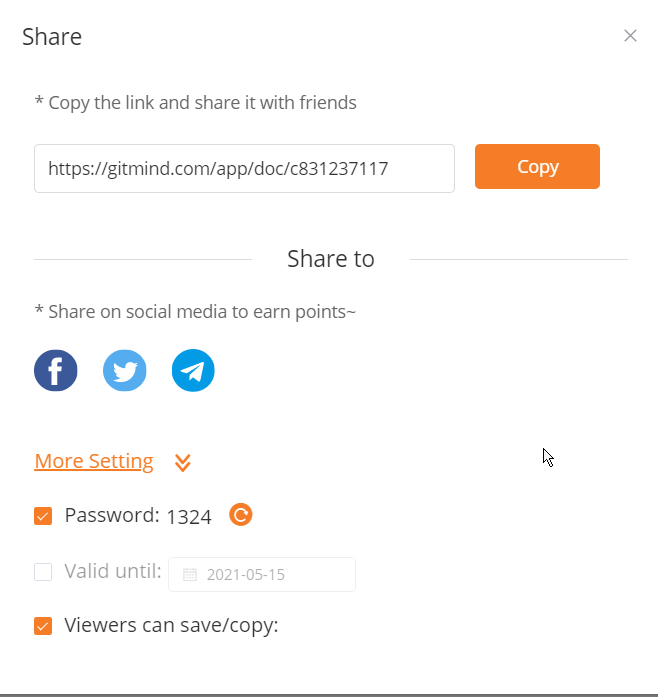
Step1 : Share with password
Copied Link is invalid

Expectation: The copied link should be valid one and should not contain these above prefix and suffix.

Posted in Manual Testing

leanpub.com: Item is missing in order if password is changed in between a purchase

Issue description:

  • While trying to make a purchase in https://leanpub.com/ , just before checking out, if user changes the password with the same browser session, purchase is successful but the item is not added in the order / transaction.

Steps to reproduce:

  1. Navigate to https://leanpub.com/
  2. Try to find any free item like book to test this.
  3. Do not login yet, just add the item in cart and proceed to check out
  4. Enter registered email id in new account creation screen while check out
  5. open a new tab in same browser and try to reset password
  6. Return to checkout page, proceed with purchase
  7. Observe that purchase is success but in order history the item is missing.

Expectation:

Item should have been added or a valid error message to be displayed to relogin with new session.

Posted in Manual Testing

Microsoft Teams: The title of the Teams meeting is not encoding the character “&” correctly.

Bug Description:

The title of the Teams meeting is not encoding the character “&” correctly.

Steps to reproduce:

The title of the Teams meeting is not encoding the character “&” correctly.

Steps to reproduce:
1- Create a meeting in outlook with title as “Some meeting & chat”
2- Add a Teams invite
3- Join the meeting and notice that the meeting title is displayed as “Some meeting & chat”

Refer to the screenshots.

Teams Title
outlook title

Reported to microsoft teams user voice

Posted in Manual Testing

Lastpass.com : Unicode Character “’” (Apostrophe) is not properly encoded in pop up message.

Bug description:
The Unicode Character “’” ( Apostrophe) is not properly encoded in the javascript alert pop up in forgot password screen.

Steps to reproduce:

  1. Navigate to https://lastpass.com/forgot.php
  2. Enter any test email ( test@example.com) or real email in email text box
  3. Click on the button “Send Hint”
  4. Notice that there will be a Javascript alert pop up displaying the text
    We &#39 ; ve sent a reminder to test@example.com. Be sure to check your spam folder. If you receive nothing, make sure the email you used is actually registered as a LastPass account.

Expectation:

The character Apostrophe (‘) should have been encoded properly. Like
“We ‘ve sent a reminder………”

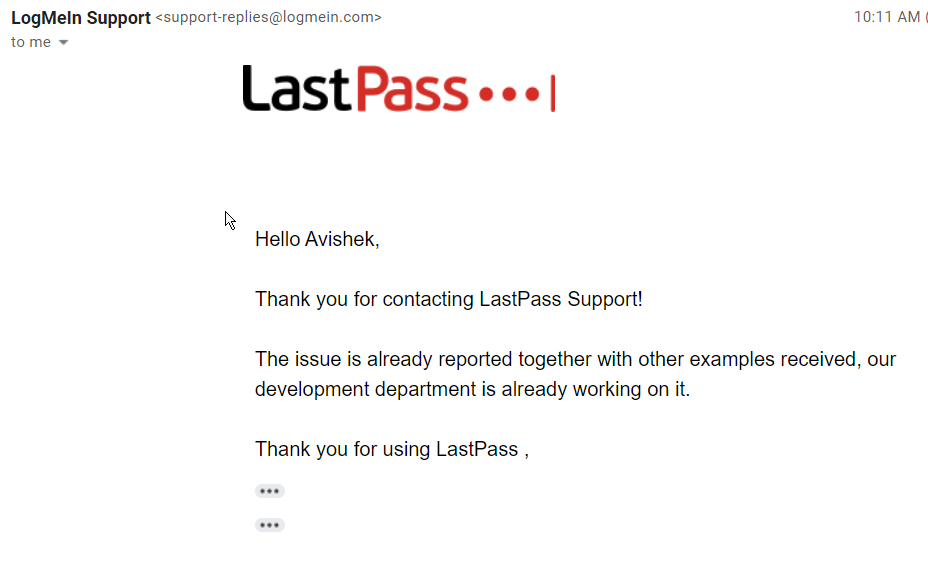
Bug reported to them and response below:

Response received

Posted in Manual Testing

nobroker.com : Whatsapp notofication is subscribed even if option is turned off

Seems like there is an issue or if not this is a serious violation of user’s consent.I received whatsapp notification even when I selected whatsapp option as No(toggle button disabled)
1- When I navigated to profile update, whatsapp option was by default turned on2- I turned it off, and clicked save profile3- Immediately I got whatsapp notification saying (pic attached)

Please look into this issue on high priority, this is a breach of user data policy.
I will have to take legal action if I do not get a response.

image.png
image.png
Posted in Manual Testing

CORS: Test a URL’s Cross origin policy

During testing we sometimes face issues with CORS issue as below:

Access to XMLHttpRequest at ‘https://domainname.com’ from origin ‘null’ has been blocked by CORS policy: No ‘Access-Control-Allow-Origin’ header is present

What is CORS?

Cross-Origin Resource Sharing (CORS) is a mechanism that uses additional HTTP headers to tell browsers to give a web application running at one origin, access to selected resources from a different origin. A web application executes a cross-origin HTTP request when it requests a resource that has a different origin (domain, protocol, or port) from its own.

Source: https://developer.mozilla.org/en-US/docs/Web/HTTP/CORS

How to Test?

I found an easy and beautifully explained article by Nick Gibbon

Read Here

Posted in Blog

Aesthetic and clean desktop look

Most of us have our desktop icons so messed and unorganized that, sometimes we find difficulty to find the name of the software that we are looking for. It also looks so dirty.

Having a clean and organized desktop in windows / Mac gives a good feeling and makes life easier to find what we need quickly.

I cam across an amazing desktop icon organizer theme and tried it on my Windows 10 laptop. It looks so beautiful.

Check this video for brilliant tutorial. ( Do not forget to watch the intro carefully, it is brilliant )

1- Adding beautiful widgets

Curtesy: Tanjim The Tech Guy

Rainmeter software link: https://www.rainmeter.net/
Theme: https://www.deviantart.com/hiphopium/art/Lumiero-828277050
Blue Mountain_Theme Folder_Tanjim: https://mega.nz/#!R4dRFSjD!PvO5Qa1Fdb.

Posted in Automation Testing

Selenium: Cleaning up WebDriver instances using Java

While working with UI test automation, Selenium being most popular choice, people use it quite heavily.

However out of many best practices, the Webdriver clean up process is also critical.

Why?

  1. If WebDriver is not closed properly, it still remains active in the system and consumes memory, which leads the system slow.
  2. This issue becomes bottleneck while working with massive parallel tests and the system can not handle tests properly due to memory leakage happened due to these unattended WebDriver processes.
  3. Even though we use driver.quit(), it will only get executed if the test gets executed till the end , but if the test fails abruptly due to some issue, the quit() method do not close the WebDriver process.

Solution:

Just like we write driver.quit() for each Test we also need to include the process termination code.
Mainly we launch fresh WebDriver instances every time for each Test hence we keep driver.quit() in @AfterMethod.

However we can not keep Terminate process code here because, if we are running parallel Tests, it might kill those too. So it is better to keep the process termination script at the very end, when all the Tests are executed.

This can be in @AfterSuite .
Below is the code for Java:

  public static void terminateWebDriverProcess() {
        log.info("<<< WebDriver process cleanup >>>");
        try {
            if (System.getProperty("os.name").contains("Windows")) {
  Process process = Runtime.getRuntime().exec("taskkill /F /IM chromedriver.exe /T");
  process.destroy();
  log.info("All active WebDriver processes terminated !");
            } else {
                log.info("No active WebDriver process found!");
            }
        } catch (Exception e) {
            log.info("<<< Error occured while cleaning up WebDriver process." + e);

        }

Note:
– you can alter the script if you are on Mac or Linux.
– Replace log.info() with SYSOUT if logger is not implemented.