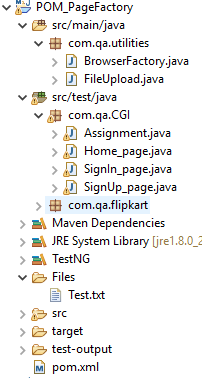
What is POM?
Page factory model is a design pattern to organize test cases and web elements locators separately
All element locators are stored in a class file separately from test cases
What is page class?
It contains element locators
it contains methods related to that page functionality
What is Test case class?
It contains the actual test cases.
It calls the methods from its respective page classes.
What is page factory?
Page factory is a in built class in selenium for maintaining object repository.
iniElement() is used to look up elements in page class and to initialize.
It allows storing elements in cache memory using cachelookup.
POM with out Page factory uses BY, whereas POM with page factory uses FindBy to locate elements.
CacheLookup, is useful to speed up the execution process.
It stores the locators from cache memory and directly use to find the elements. It does not search the locators in DOM during run time.
It should only be used if locators are static and do not change else it will throw stale element error.
Environment setup:
POM.XML
– WebDriver Manager
– TestNG
– Selenium webdriver
<dependencies>
		<!-- https://mvnrepository.com/artifact/org.seleniumhq.selenium/selenium-java -->
		<dependency>
			<groupId>org.seleniumhq.selenium</groupId>
			<artifactId>selenium-java</artifactId>
			<version>3.141.59</version>
		</dependency>
		<dependency>
			<groupId>io.github.bonigarcia</groupId>
			<artifactId>webdrivermanager</artifactId>
			<version>3.6.1</version>
			<scope>test</scope>
		</dependency>
		<dependency>
			<groupId>org.testng</groupId>
			<artifactId>testng</artifactId>
			<version>6.14.3</version>
			<scope>test</scope>
		</dependency>
	</dependencies>
Step1: Create Page class
Ex: Home_page.java
import java.util.List;

import org.openqa.selenium.WebDriver;
import org.openqa.selenium.WebElement;
import org.openqa.selenium.support.FindBy;
import org.openqa.selenium.support.How;
import org.openqa.selenium.support.PageFactory;

public class Home_page {

	WebDriver driver;
	public Home_page(WebDriver Ldriver) {
		this.driver=Ldriver;
	}

	@FindBy(how = How.CSS, using = "#navbar > div.navbar-nav.mr-auto > a:nth-child(2)")
	public WebElement address_menu;

	@FindBy(how = How.XPATH, using = "//a[text()='New Address']")
	public WebElement NewAdd_link;

	@FindBy(how = How.NAME, using = "address[first_name]")
	public WebElement firstName;

	@FindBy(how = How.NAME, using = "address[last_name]")
	public WebElement lastName;

	@FindBy(how = How.NAME, using = "address[address1]")
	public WebElement address1;

	@FindBy(how = How.NAME, using = "address[city]")
	public WebElement city;

	@FindBy(how = How.NAME, using = "address[zip_code]")
	public WebElement zip;

	@FindBy(how = How.ID, using = "address_state")
	public WebElement stateList;

	@FindBy(how = How.ID, using = "address_country_canada")
	public WebElement country_canada;

	@FindBy(how = How.ID, using = "address_birthday")
	public WebElement birthday;

	@FindBy(how = How.ID, using = "address_picture")
	public WebElement picture;

	@FindBy(how = How.NAME, using = "commit")
	public WebElement createAddress;

}
2- Create Test class
Ex: TestHomePage.java
import java.util.List;
import java.util.concurrent.TimeUnit;

import org.openqa.selenium.Alert;
import org.openqa.selenium.By;
import org.openqa.selenium.WebDriver;
import org.openqa.selenium.WebElement;
import org.openqa.selenium.chrome.ChromeDriver;
import org.openqa.selenium.support.PageFactory;
import org.openqa.selenium.support.ui.Select;
import org.testng.annotations.AfterClass;
import org.testng.annotations.BeforeClass;
import org.testng.annotations.Test;

import io.github.bonigarcia.wdm.WebDriverManager;

public class Assignment {

	private static WebDriver driver;

	@BeforeClass
	public static void setupClass() {
		WebDriverManager.chromedriver().setup();
		driver = new ChromeDriver();
	}

	@Test
	public void TC01() {
		String appURL = "http://a.testaddressbook.com/sign_up";

		// Navigating to the Application URL
		driver.get(appURL);
		driver.manage().timeouts().implicitlyWait(20, TimeUnit.SECONDS);
		SignUp_page signupPage = PageFactory.initElements(driver, SignUp_page.class);

		signupPage.email_txt.sendKeys("Your_Name@abc.com");
		signupPage.password_txt.sendKeys("admin");
	}

	@Test
	public void TC02() {
		String appURL = "http://a.testaddressbook.com/sign_in";

		// Navigating to the Application URL
		driver.get(appURL);
		driver.manage().timeouts().implicitlyWait(20, TimeUnit.SECONDS);
		SignIn_page signinPage = PageFactory.initElements(driver, SignIn_page.class);
//		Home_page homePage = PageFactory.initElements(driver, Home_page.class);
		Home_page homePage = new Home_page(driver);
		PageFactory.initElements(driver, Home_page.class);

		signinPage.email_txt.sendKeys("test@xyz.com");
		signinPage.password_txt.sendKeys("test");
		signinPage.signIn_btn.click();

		homePage.address_menu.click();
		homePage.NewAdd_link.click();
		String firstname = "Test Name1";
		homePage.firstName.sendKeys(firstname);
		homePage.lastName.sendKeys("Test Name");
		homePage.address1.sendKeys("add1");
		homePage.city.sendKeys("City");
		homePage.zip.sendKeys("45454");
		Select dropdown = new Select(homePage.stateList);
		dropdown.selectByVisibleText("Idaho");
		homePage.country_canada.click();
		homePage.birthday.sendKeys("30-04-1987");
		homePage.picture.sendKeys("C:\Users\Wildwolf\eclipse-workspace\POM_PageFactory\Files\Test.txt");
		homePage.createAddress.click();

		homePage.address_menu.click();
		driver.findElement(By.xpath("//tbody/tr[contains(.,'" + firstname + "')]/td/a[text()='Destroy']")).click();
		Alert alert = driver.switchTo().alert();
		alert.accept();

	}

	// @AfterClass
	public void teardown() {
		if (driver != null) {
			driver.quit();
		}
	}
}
3- Create a generic class for browser driver
This will take browser name , URL and return the driver
import org.openqa.selenium.WebDriver;
import org.openqa.selenium.chrome.ChromeDriver;
import org.openqa.selenium.firefox.FirefoxDriver;

public class BrowserFactory {

	/**
	 * This class is to initialize and setup browser before execution
	 */

	static WebDriver driver;

	public static WebDriver startBrowser(String browser,String appURL) {

		if(browser.equalsIgnoreCase("chrome")) {
			driver=new ChromeDriver();

		}
		else if(browser.equalsIgnoreCase("firefox")) {
			driver=new FirefoxDriver();
		}
		else {
			System.out.println("Invalid browser name!");
		}

		driver.manage().window().maximize();
		driver.get(appURL);

		return driver;
	}
}
 TechieWolf