Posted in Automation Testing

Extent report4 with testNG and Java

I have created a git repo with the code which was inspired from
https://www.youtube.com/watch?v=0ZKmMVqW-b0&t=1400s
https://www.youtube.com/watch?v=j1mHtrgVcIM&list=PL5fOKT7XR42Om0spD8QtxuQ4Y9ONra6dq&index=13

Git repo: https://github.com/avighub/ExtentReport4-testNG-java
This extent report has below Features:

it can be easily plugged in to any Java – testNG framework for a beautiful Dashboard report.
It has separate Listener configuration : TestListeners.java, which has default setting for all Test() based on pass, skip, fail and it will capture package name, method name into report, no need to explictly write it in Test() method. Only Test related info can be added.
For Failed cases, stack trace error log and screenshot is added automatically by TestListeners.java, no need to add any extra steps.

Steps to add this report in existing project:

  1. Add ExtentReportManager.java and TestListerns.java in your config package or anywhere in your project
  2. Add listner @Listeners({TestListeners.class}) in Test base as shown in Testbase.java.
    or else add listener in testng.xml file:
    <listeners>
    <listener class-name=”packagename.TestListeners”></listener>
    </listeners>
  3. Make sure to extend TestBase class in TestListeners class
Posted in Automation Testing

API Testing : Exploring and techniques

Recently I did a course on exploring API testing by Amber race from test automation university.
https://testautomationu.applitools.com/exploring-service-apis-through-test-automation/

It taught so many amazing things which can be applied to any API testing and really it is powerful. I have tried to put down some important points:

  1. P.O.I.S.E.D. testing heuristic
    P-Parameters
    O-Output
    I-Interoperability
    S-Security
    E-Error
    D-Data
  2. API Contract:
    Request:
    – Endpoint
    – Header
    – Body and data types
    – Request type (xml/json)
    Response:
    – status code
    – Header
    – Body structure and data type
    – Request type (xml/json) – try to convert xml to json and vice versa for structure
  3. To work with API response in mobile devices
    use Fiddler or Charles tool
  4. API testing strategy

More reference on exploratory API testing from Ministry of Testing:
https://www.ministryoftesting.com/dojo/lessons/exploratory-testing-an-api?s_id=227301

Posted in Automation Testing

Javascript: Debugging in Visual studio code

While working with Javascript we always need debugging capability to find out the problems in our javascript code execution

So in Visual studio code (vs code) we have many options to debug
1- Using debugger keywork in code
Put “debugger;” in the place where you want to pause the execution and it will pop up in the chrome developer tool

2- Best way is to install debugger extension:
Installing debugger for chrome in vs code will do the same but without have to write any code for debugging .

Reference:
https://code.visualstudio.com/docs/editor/debugging

Posted in Automation Testing

Javascript: Automate REST API using AXIOS

While working with test automation we need API tests to be run as part of the automation.
Those who are familiar with Java, they mostly use Rest Assured library to automate REST apis.
But for javascript Rest assured is not supported and hence we have many javascript libraries who does the job for us. Among many such libraries I have tried few of them and they pretty much work similar.

Here are few of the liraries:
1- Axios
https://www.npmjs.com/package/axios
2- Supertest
https://www.npmjs.com/package/supertest
3- request (http) Do not user – Deprecated
https://github.com/request/request/issues/3143

I found AXIOS to be better and easy to write tests, but again superTest is also good one.
I will explain how to use AXIOS in this article and also focus on Async calls which is importat while we inject API calls in between UI calls (Protractor)

Setup:
1- Install npm
2- Install axios
npm install –save-dev axios

3- Create a test file name : testApi.js

//This is to enable axios autosuggestion and make axios command availabe
var axios = require("axios").default;

var baseUrl = 'https://reqres.in/api/users/2';
describe("First Test Suite", function () {

it("API Test using AXIOS", async () => {
         //It waits till API response is received then moves to print the 
         //  response
        const response = await axios.get(baseUrl); 
         // response object has data property which stored the json response 
        //body
        console.log('Response=' + JSON.stringify(response.data))
    })
}

If you observe we have used async and await in the api.
The reason is, in javascript we must follow async / sync to let it know that we are expecting delay or wait till we get the response or call back is finished.
Else it will move to next line without having the api call finished.
It does not work like java, the line by line execution as long as we mention async .

If we remove async and await in the above code, we will get undefined response.

So it is important to use async and await while using API calls even in Protractor UI code.

4- Printing json response to console

// response object has data property which stored the json response body
console.log('Response=' + JSON.stringify(response.data))

5- Parsing string to json

//Json response is converted to string
var jsonResToString=JSON.stringify(response.data);

//Converting it back to json object
var myObj = JSON.parse(jsonResToString)

//Printing it to console
var jsonResToString=JSON.stringify(myObj.data);

6- Extracting value from json object

var myObj = JSON.parse(jsonResToString)

//Printing it to console
var jsonResToString=JSON.stringify(myObj.data);

//Extracting value (instead of jsonKey pass the key of json
var value = myObj.jsonKey

Posted in Automation Testing

Javascript: Promises

A promise is one of these states:
1- Pending : Initial state, neither fulfilled nor rejected
2- fulfilled: Request is completed
3- Rejected: Request is rejected

In javascript we use below ways to handle promises:
1- using then() function
2- Using async and await (easy and best)

Curtesy: LetCode youtube Chanel
Posted in Automation Testing

TestNG: ITestContext

ITestContext is basically used to store and share data across the tests in selenium by using TestNG framework.

Let us consider below scenario –We have 10 test cases (@Test methods) to be executed to complete one end to end test case.
Now in call 10 test cases (@Test methods) we are sharing some data like “Customer_id”, which should be unique and same in our end to end test case i.e. in our 10 @Test methods. During the execution of end to end test case, it should be same.

To handle this scenario, we have two ways –   

  1.    If all 10 @Test methods are in same class, then we can store “Customer_id”  in a class level variable (instance variable)  and share it. But it may require high maintenance.
  2. Another way to handle this is, ITestContextLet us see How ITestContext works.In any @Test method, we can use “iTestContext” by passing it as a parameter to the method
@Test
 public void test1a(ITestContext context){
 
 }

Here, we can set the value that we want to share  in ITestContex, as below 

@Test
 public void test1a(ITestContext context){
 
  String Customer_id = "C11012034";
  context.setAttribute("CustID", Customer_id);
 } 

Now, we can get this value, which is stored in ITestContext variable with other tests, as below –

String Customer_id1 = (String) context.getAttribute("CustID");

Below piece of code can help you to understand how ITestContext works.

package iTestContextLearn;

import org.testng.ITestContext;
import org.testng.annotations.BeforeTest;
import org.testng.annotations.Test;

public class Test1 {

 @BeforeTest
 public void SetData(ITestContext context){
 
  String Customer_id = "C11012034";
  context.setAttribute("CustID", Customer_id);
  System.out.println("Value is stored in ITestContext");
  System.out.println("+++++++++++++++++++++++++++++++++++++++++++++++++");

 }
 @Test
 public void Test1a(ITestContext context){
  String Customer_id1 = (String) context.getAttribute("CustID");
  System.out.println("In Test1, Value stored in context is: "+Customer_id1);
  System.out.println("+++++++++++++++++++++++++++++++++++++++++++++++++");

 }
 @Test
 public void Test2a(ITestContext context){
  String Customer_id1 = (String) context.getAttribute("CustID");
  System.out.println("In Test2, Value stored in context is: "+Customer_id1);
  System.out.println("+++++++++++++++++++++++++++++++++++++++++++++++++");

 }
}

Note: We can pass this context to methods present in different classes and can use.

Source:
https://automationtalks.com/2017/07/06/what-is-itestcontext-in-testng-seleniu/

Posted in Automation Testing

SQL : Basics and Best practices

While working with DB connection it is important to follow Proper coding practice for DB open and close connection.

DB connection pooling is a good way to manage it.
We can use apache DB Util library for the same.

Few important things to know:

  1. Preparing scrollable resultset :
    As we all know a general resultset is only forward scrollable and not backward.
    As a limit of this, if we want to travel backward to the start of the record in resultset we can not do as it is not backward scrollable.
    Ex: We have done the iteration and printed the records using
    while(resultset.next())
    Now if we want to go back to 1st record and perform some more operation, we can not do.

    But there is a way to avoid this limitation , by making it scrollable backward.

    Statement st=con.createStatement ( ResultSet.TYPE_SCROLL_INSENSITIVE, ResultSet.CONCUR_READ_ONLY );
    ResultSet rs=st.executeQuery (“select * from empleyee”);

    This will be useful to reuse the resultset as per the need.

    Ex: After doing the 1st iteration we can bring the cursor to start
    resultset.beforeFirst or resultset.first
    This will bring the cursor to the start of 1st row.

Posted in Automation Testing

Jmeter: Setting up and running sample test using Jenkins

Please follow this link for very nicely written tutorial for entire Jmeter series.
https://artoftesting.com/jmeter-tutorial

Official Link :
https://jmeter.apache.org/usermanual/get-started.html

However while working with Jmeter I felt the need of few important things that would help me perform some basic test and generate report, which I want to highlight here to get you all started quickly.

  1. Download Jmeter and launch the jar
  2. Create a TestPlan:
    1. By default a new test plan is opened, rename it as per the test scenario name
  3. Create a ThreadGroup:
    1. R-click on Testplan — > Add– > Threads — > Thread Group
    2. Rename the Thread group as per the number of concurrent users_ramp up time. Ex: User10_RampUpTime60Sec
  4. Create HTTP Request:
    1. R-click on ThreadGroup àsampler à HTTP Request
    2. Rename the request as per the request being called
    3. Protocol: specify https / leave blank if http
    4. Server Name/Ip: provide the BaseURL of application (appname.com/api)
    5. Method: Specify GET/POST
    6. Path:  Provide the path ( Ex: /user)
    7. Port: if any port available (Ex: 8080 )
  5. Add listener (Result ):
    1. All Listeners can be found by clicking Add->Listeners. A JMeter Listener will only collect data from JMeter elements at or above its level. If a listener is added to the script as a child element, it will only show the data related to its parent. If a listener is added under a thread group of a script that has a few thread groups, that listener will display the data of all the samplers that belong to that thread group. If you need to review reports of all the samplers in a script, place the listener at the same level of all thread groups in the script.
    2. R-click on HTTP request and add à Listener à View Results Tree
    3. Save the response : Browse the path of the result to be stored in filename field with extension of .jtl/.csv
    4. More on listeners can be found in this article:
      https://www.blazemeter.com/blog/jmeter-listeners-part-1-basic-display-formats
  6. Assertion:
    1. Add response assertion: R-click Http request àaddàAssertionàResponse assertion
      Apply to – Main sampler , Field to test – Response code , Patterns to Test – 200
    2. If you want more advanced assertion for JSON response(API)
      Add JSR223  assertion to validate.
      R-click on http request à add à Assertions à JSR223 Assertion
    3. JSR223 Assertion supports assertion using groovy/Javascript language
    4. Select language as javascript/groovy
    5. Javascript

      //Store response to var
      var responseBody = prev.getResponseDataAsString();
      log.info(responseBody)
      var jsonData = JSON.parse(responseBody);
      log.info(“Value of a field “+jsonData[0].key)

      //Save value using jsonPath expression
      var field1=jsonData[0].field1_value

      //Assert using default AssertResult utility
      if(field1!=” field1_value “){
      AssertionResult.setFailureMessage(“Test Failure”)
      AssertionResult.setFailure(true);
      }
    6. Groovy assertion script:
      https://www.blazemeter.com/blog/scripting-jmeter-assertions-in-groovy-a-tutorial
  7. Save response to file:
    1. If you want to save the response to a file, add listener , Http request à listener à save response to file.
      It will save the response to json file in jmeter/bin dir
      Check the option “Add timestamp” for saving file with timestamp
    2. Save response to CSV:
      https://medium.com/@priyank.it/responses
  8. Extract data from response:
    1. Using Extract data from response and save to variable
      First add a Debug sampler to Thread group sampler Debug sampler.
      This will help verifying response and variables in View result tree listener
      And a View result tree listener in Thread group, to capture all request info.
      If you want to extract data from XML reponse , then add post processor extractor in HTTP request à Xpath2 Extractor
    2. Provide name of variable and xpath query
      If you want to extract json value then add post processor to request à JSON Extractor
    3. Give a name to variable , json path , Match no: -1 (for all matches) , 1 for only 1 match
    4. Add a JSR223 PostProcessor to extract or execute any custom script (java/groovy/javascript)
    5. Here is an example of extracting data from response and saving to CSV file

      import org.apache.commons.io.FileUtils
      import java.text.SimpleDateFormat;

      // Get total number of matches. (Returns string)
      def resultCount = vars.get(“JsonBody_matchNr”) //This value can be get from Debug sampler response tab.
      log.info(resultCount)
      log.warn ‘Output to jmeter console ‘ +  resultCount

      // Generate timestamp to create uniue file name.
      String fileSuffix = new SimpleDateFormat(“ddMMyyyyHHmm”).format(new Date())

      // Create file Object f = new File(“results_”+fileSuffix+”.csv”)
      for (int i=1; i<=resultCount.toInteger(); i++)
      {
        // Get each matching result one by one.
      records = vars.get(“JsonBody_”+i)

      // Write result to csv file.
        FileUtils.writeStringToFile(f,records + System.getProperty(“line.separator”),true)
      }
  9. Generate HTML report:
    1. In the view result tree listener or any other listener we need to add the path to save the repost as csv or jtl file, once it is done
    2. Go to toolsà Generate HTML report
    3. Browse the jtl/csv file which was saved after execution
    4. Browser user.properties file from  C:apache-jmeter-5.2.1binuser.properties
    5. Set a out directoty ( should be empty dir)
    6. Click generate report
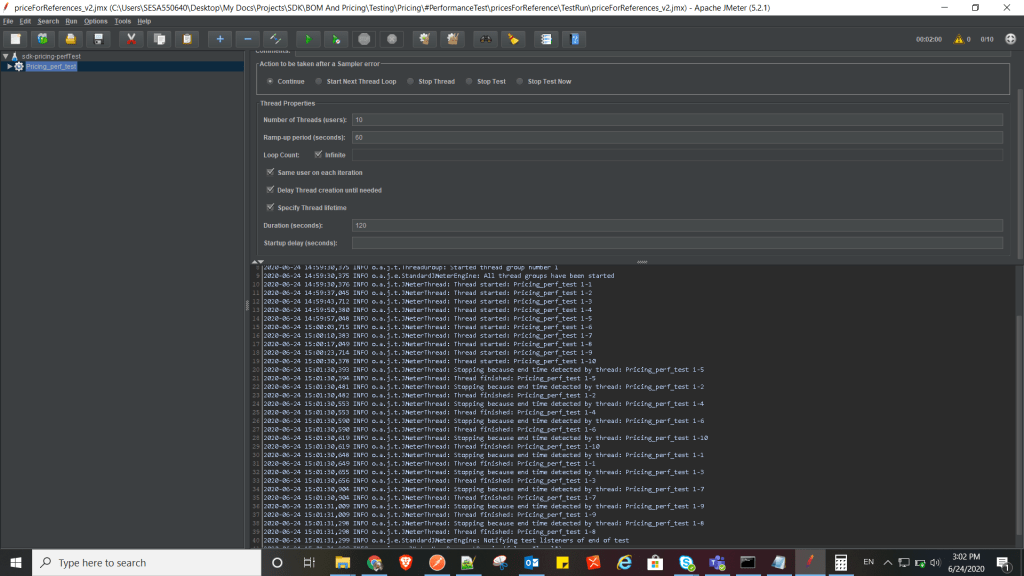
  10. Thread Group:
    1. Number of threads: Number of users to participate in load
    2. Ramp-up period (sec): Duration to onboard the given number of threads(users) to be fully available
    3. same user on each iteration: same thread will re spawn once done
    4. Loop count: How many loops will the given threads will be executed
    5. Specify thread lifetime:
      Duration(sec): Time duration till when all the threads will be active. This duration is counted from the very 1st thread is on boarded. This needs loop count to be defined either custom number or infinite.
      ( Be aware , if you set to infinite and duration as 60 sec, it will keep looping the defined number of threads for 60 seconds, it might result in sending samples of more than 10 times than number of defined samples, as it keeps on looping…)
      More info on :
      http://www.testingjournals.com/5-must-know-features-thread-group-jmeter/
      startup delay(sec): Pause between starting new thread.
  11. Running Jmeter via command line (windows )
    1. To run jmx file + save result file as jtl + save log + generate Html report
      jmeter -n -t Full_path_of_jmxyour_script.jmx -f -l Full_path_of_result_fileresult.jtl -j Full_path_to_logdirlogfile.log -e -o
    2. To run jmx file + save result file as CSV + generate Html report
      jmeter -n -t Full_path_of_jmxyour_script.jmx -f -l Full_path_of_result_fileresult.jtl -e -o Full_path_to_report_location_should_be_empty_nonExistent
    3. To run jmx file + save result file in csv
      jmeter -n -t Full_path_of_jmxyour_script.jmx -l Full_path_to_report_locationcsvFileFileName.csv
    4. To generate a Report from existing CSV/JTL file:
      jmeter -g Full_path_of_result_fileresult.jtl/.csv -o [path to output folder (empty or not existing)]

      jmeter -g Full_path_of_result_fileresult.jtl -o Full_path_to_report_location_should_be_empty_nonExistent
      -n : non gui mode
      -t : specifies the path to source .jmx
      -j : log-file
      -f: overwrite the existing results file
      -l: results-file
      -p: property-file
  12. Running jmeter via Jenkins
  13. Adding performance dashboard in jenkins
    1. Add this plugin to jenkins
      https://plugins.jenkins.io/performance
    2. In the jenkins job, add post build action –
      Publish performance test report
    3. Source data files (autodetects format): Provide the path of .jtl/.csv result file
    4. After execution this is show in dashboard
  14. Running jenkins job periodically ( scheduler)
    Refer the help section of jenkins
Sample Test plan
Example of Loop count and Duration , Delay. Notice the thread start and end time.

Best practices :
https://jmeter.apache.org/usermanual/best-practices.html

  • Disable / Delete listeners while running in command line to save memory and faster execution
  • Use Full path while specifying path of result, log, html report

Posted in Automation Testing

TestNG: Retry mechanism

Every time tests fail in a suite, TestNG creates a file called testng-failed.xml in the output directory. This XML file contains the necessary information to rerun only these methods that failed, allowing you to quickly reproduce the failures without having to run the entirety of your tests.

Sometimes, you might want TestNG to automatically retry a test whenever it fails. In those situations, you can use a retry analyzer. When you bind a retry analyzer to a test, TestNG automatically invokes the retry analyzer to determine if TestNG can retry a test case again in an attempt to see if the test that just fails now passes. Here is how you use a retry analyzer:

  • Build an implementation of the interface org.testng.IRetryAnalyzer
  • Bind this implementation to the @Test annotation for e.g., @Test(retryAnalyzer = LocalRetry.class)
import org.testng.IRetryAnalyzer;
import org.testng.ITestResult;
 
public class MyRetry implements IRetryAnalyzer {
 
  private int retryCount = 0;
  private static final int maxRetryCount = 3;
 
  @Override
  public boolean retry(ITestResult result) {
    if (retryCount < maxRetryCount) {
      retryCount++;
      return true;
    }
    return false;
  }
}
import org.testng.Assert;
import org.testng.annotations.Test;
 
public class TestclassSample {
 
  @Test(retryAnalyzer = MyRetry.class)
  public void test2() {
    Assert.fail();
  }
}