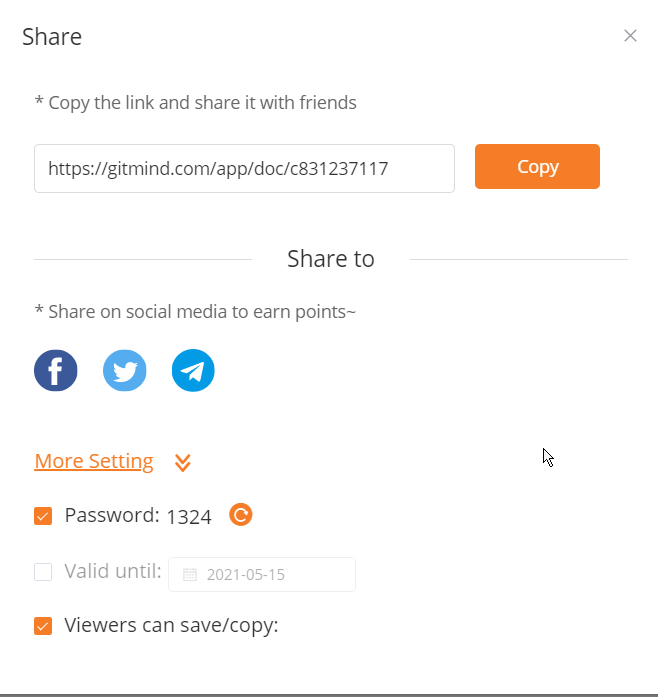
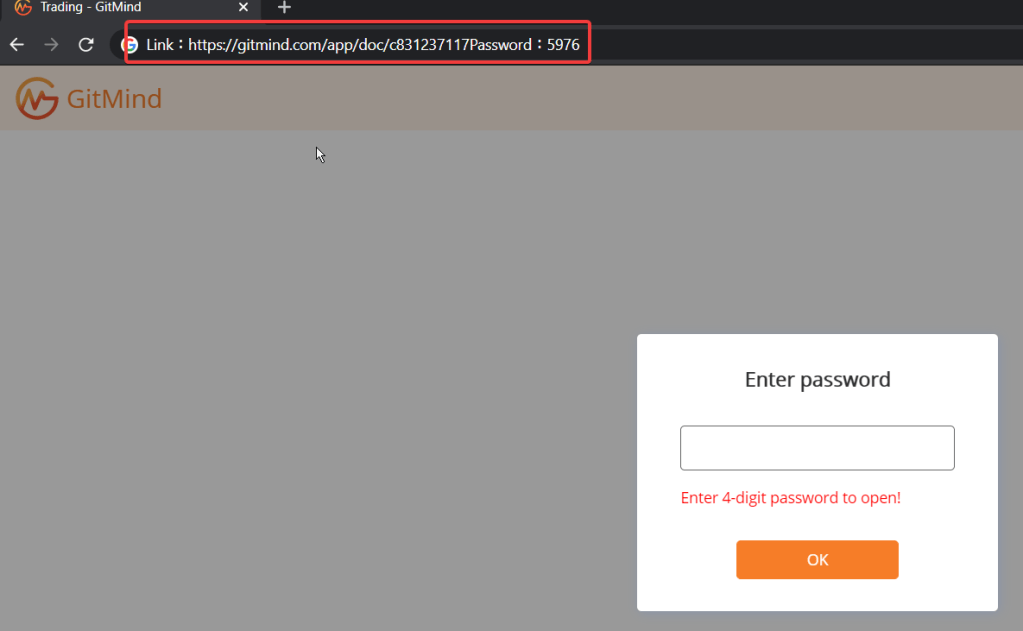
Bug description: When user shares a mindmap with the option password, then clicks on copy button to copy the link to share , the link gets copied with incorrect details added to it.
While trying to make a purchase in https://leanpub.com/ , just before checking out, if user changes the password with the same browser session, purchase is successful but the item is not added in the order / transaction.
The title of the Teams meeting is not encoding the character “&” correctly.
Steps to reproduce:
The title of the Teams meeting is not encoding the character “&” correctly.
Steps to reproduce: 1- Create a meeting in outlook with title as “Some meeting & chat” 2- Add a Teams invite 3- Join the meeting and notice that the meeting title is displayed as “Some meeting & chat”
Enter any test email ( test@example.com) or real email in email text box
Click on the button “Send Hint”
Notice that there will be a Javascript alert pop up displaying the text “We' ;ve sent a reminder to test@example.com. Be sure to check your spam folder. If you receive nothing, make sure the email you used is actually registered as a LastPass account.“
Expectation:
The character Apostrophe (‘) should have been encoded properly. Like “We‘ve sent a reminder………”
Seems like there is an issue or if not this is a serious violation of user’s consent.I received whatsapp notification even when I selected whatsapp option as No(toggle button disabled) 1- When I navigated to profile update, whatsapp option was by default turned on2- I turned it off, and clicked save profile3- Immediately I got whatsapp notification saying (pic attached)
Please look into this issue on high priority, this is a breach of user data policy. I will have to take legal action if I do not get a response.
During testing we sometimes face issues with CORS issue as below:
Access to XMLHttpRequest at ‘https://domainname.com’ from origin ‘null’ has been blocked by CORS policy: No ‘Access-Control-Allow-Origin’ header is present
What is CORS?
Cross-Origin Resource Sharing (CORS) is a mechanism that uses additional HTTP headers to tell browsers to give a web application running at one origin, access to selected resources from a different origin. A web application executes a cross-origin HTTP request when it requests a resource that has a different origin (domain, protocol, or port) from its own.
As a tester , we not only do explore, understand , learn and test applications but also we need to document our findings which can either be a bug , risk or have negative impact to the application under test.
To document we may have many ways depending on the individuals. Some prefer simple word document, some does excel sheet, some use cloud documents ( For collaborative documentation) or some use Project management tools lile JIRA which has in built features of documentations.
But we must always have tools which helps us capture those findings quickly without having us to spend more time which will distract us or loose our focus on testing.
So we might need some tools which can be installed in system or as an browser extension. Below are few tools that I use regularly which helps me increase my productivity.
Screenshot tool ( Desktop) : Lightshot It is available a desktop based application which works brilliantly. Best part of this is – Takes full page screenshot ( Including browser URL, which most browser extensions may lack) – After taking screenshot it allows to edit, highlight , save to local or cloud , copy to clipboard and many more features… -Binds the quick shortcut key with System default prtSc / printscreen key for easy access.
2. Screenshot tool : (Chrome extension ) GoFullPage – Full Page Screen Capture This is another awesome extension for browsers which does almost same as above but since it run inside browser, it can not take URL in screenshot. Also it does not require any permission as most other extension asks for permissions like browsing history,microphone,camera etc which is very dangerous specially while working with sensitive data in a organisation or personal level.
4. Screenshot and Video capture ( Windows app) : ShareX This is one of the best tool and loads of features. – It can capture screenshot ( with all edit features) and also capture video – It has feature to save locally or share via almost any online platform.
There is a common question or confusion between endpoint and resource while testing API. Understanding it properly will improve the idea of not only testing it but also to improve the communication more technically to the team I found a great explanation from a user on stackoverflow. Thought to write it down here.
The terms resource and endpoint are often used synonymously. But in fact they do not mean the same thing.
The term endpoint is focused on the URL that is used to make a request. The term resource is focused on the data set that is returned by a request.
Now, the same resource can often be accessed by multiple different endpoints. Also the same endpoint can return different resources, depending on a query string.
Let us see some examples:
Different endpoints accessing the same resource Have a look at the following examples of different endpoints:
/api/companies/5/employees/3 /api/v2/companies/5/employees/3 /api/employees/3 They obviously could all access the very same resource in a given API.
Also an existing API could be changed completely. This could lead to new endpoints that would access the same old resources using totally new and different URLs:
/api/employees/3 /new_api/staff/3 One endpoint accessing different resources If your endpoint returns a collection, you could implement searching/filtering/sorting using query strings. As a result the following URLs all use the same endpoint (/api/companies), but they can return different resources (or resource collections, which by definition are resources in themselves):
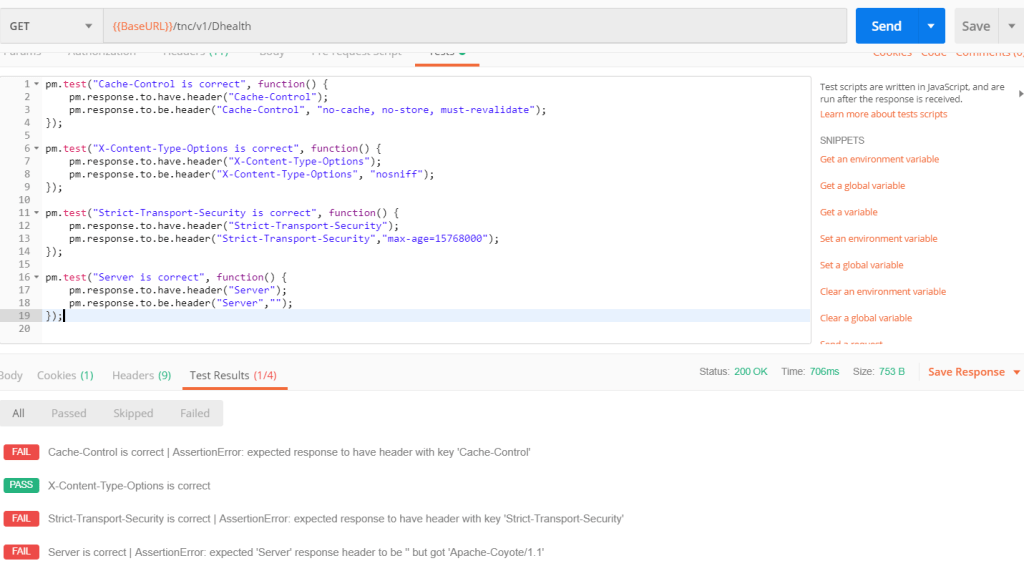
While working with POSTMAN , we need to validate many headers and values as part of API testing. We can validate API response and Headers using javascript under TEST tab. Please note that POSTMAN comes with two variants: 1- Chrome extension (Deprecated but still can be used) 2- Desktop application (Recommended)
We will discuss the examples in both variants.
1- Validate a header has expected value
//POSTMAN Desktop App
pm.test("Cache-Control is correct", function() {
   pm.response.to.be.header("Cache-Control", "no-cache");
});

//POSTMAN - Extension
tests["Cache-Control is correct"] = postman.getResponseHeader("Cache-Control","no-cache");
2- Validate Header is present
//POSTMAN Desktop App
pm.test("Cache-Control is present", function() {
   pm.response.to.have.header("Cache-Control");
});

//POSTMAN - Extension
tests["Cache-Control is present"] = postman.getResponseHeader("Cache-Control");




 TechieWolf