Install heroku CLI to see logs for debugging
Category: Others
Git: generate ssh key and add in repo ( gihub/bitbucket)
Selenium: Fix timeout warning logs for chrome
System.setProperty(“webdriver.chrome.silentOutput”,”true”);
QA vs Tester
Recently I came across a great article by Roman Savin from qatutor.com.
Amazingly and simply explained the difference between QA and Tester.
Note than QA and Tester is interchangeably used in today’s Testing world, but there is a difference and it makes a lot of sense.
Example
A certain Mr. G. realized one day that his life was boring and uneventful, so he left his wife and their little son. In order to spice up his existence, he moved to another city and started all over. Many years passed. One day his ex-wife calls him and asks him to influence his twelve-year-old son who has started to smoke, has been caught at the movies ditching math class, and has made several futile yet confident attempts to kiss his neighbor Jessica. The situation appears to require a father’s firm hand.
The QA approach would be if ex-husband never left his wife and raised their son, trying to prevent bad seeds in son’s behavior.
The testing approach occurs when the ex-husband
- compiles a list of issues like: “actual: movie; expected: math”
- locks the little rascal in a mountain cabin, limiting his spiritual and sexual life to French literature of XIX century
- hires private tutors who are supposed to look at the list and mold the boy to make sure that all the issues on the list are dealt with
Brain positioning
The purpose of QA is to prevent bugs
The purpose of testing is to find and address bugs that have not been prevented
Reference:
https://www.qatutor.com/qa-course/lecture-2-the-purpose-of-testing/testing-and-qa/
Selenium-java: Get session / local storage data
It is important to check session and local storage while testing web browser functionalities.
As part of test automation, sometimes we feel the need of getting certain data from session or local storage.
For example: access token can be obtained from the browser session or local storage.

There different ways to do that using Selenium.
1- Using Augmenter
//import packages
import org.openqa.selenium.WebDriver;
import org.openqa.selenium.html5.LocalStorage;
import org.openqa.selenium.html5.SessionStorage;
import org.openqa.selenium.html5.WebStorage;
import org.openqa.selenium.remote.Augmenter;

WebDriver driver = new ChromeDriver();
WebStorage webStorage = (WebStorage) new Augmenter().augment(driver);

// using local storage
LocalStorage localStorage = webStorage.getLocalStorage();
localStorage.setItem("key1","value1");
localStorage.getItem("token");
driver.navigate().refresh();

// using session storage
SessionStorage sessionStorage = webStorage.getSessionStorage();
sessionStorage.setItem("key1","value1");
sessionStorage.getItem("token");
driver.navigate().refresh();
2- Using Javascript executor
//import packages
import org.openqa.selenium.JavascriptExecutor;
import org.openqa.selenium.WebDriver;

WebDriver driver = new ChromeDriver();
JavascriptExecutor jsExecutor = (JavascriptExecutor) driver;

//Session storage
String sessionStorage= (String) jsExecutor.executeScript(String.format("return window.sessionStorage.getItem('%s');", "token"));
System.out.println(sessionStorage);

//LocalStorage
tring localStorage= (String) jsExecutor.executeScript(String.format("return window.localStorage.getItem('%s');", "token"));
System.out.println(localStorage);
This will print the json value as shown as the above picture.
{“access_token”:”00Dg0000006I2Oa!AQkAQAzQYGM6f_ihsrTMPSDxccExUCmw4q5wlJDIBgMn1RLvdYZeMwn194o71pPTpSdYHG63nVmOxVKU3xSaXCKQNDsJh6r2″,”received_at”:1586876101101}
Now we can parse this string to json object and extract the access_token value.
TestNG: Data driven testing using Data Provider and testng.xml
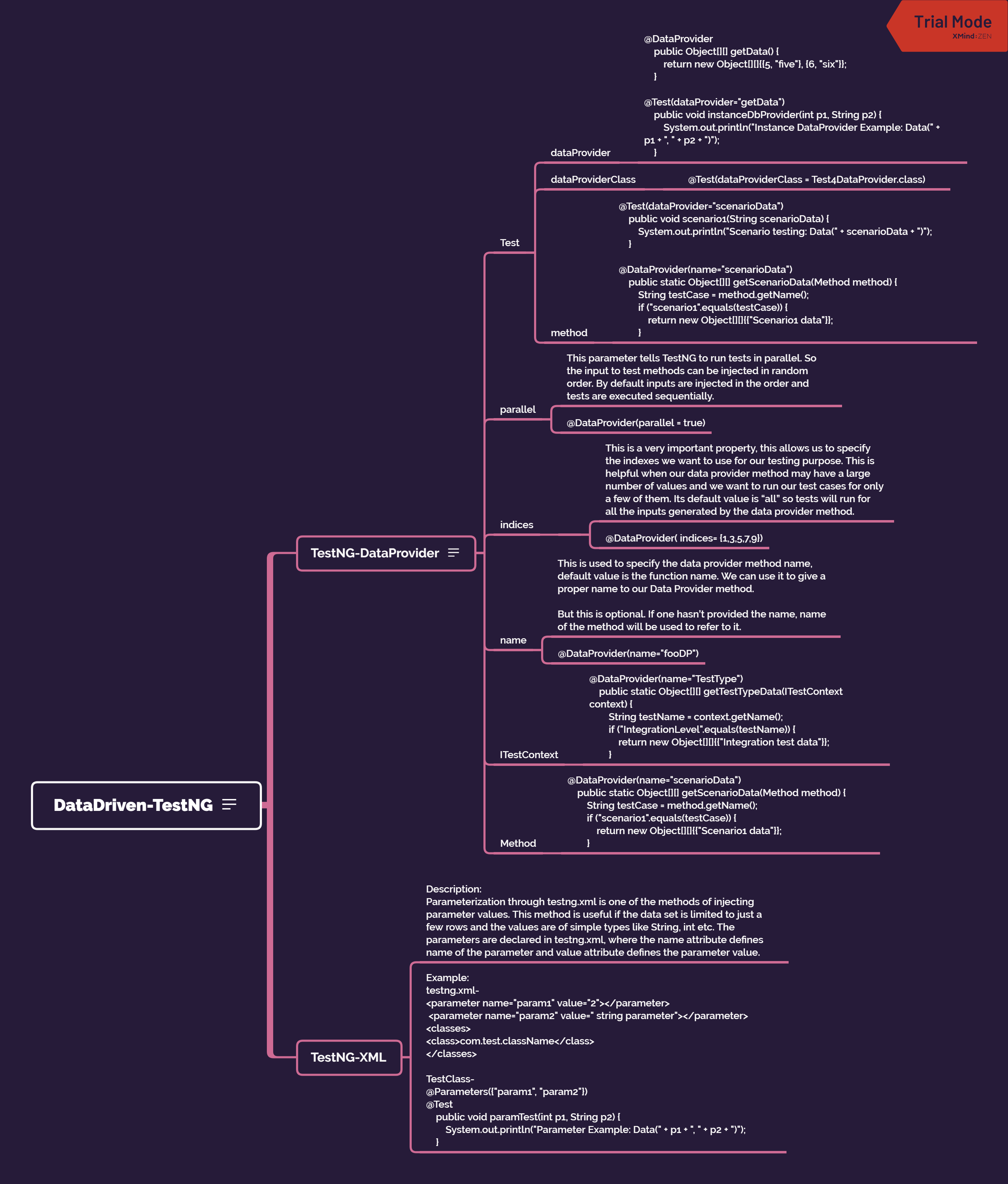
DataDriven-TestNG
TestNG supports two different ways of injecting parameter values.
Parameterization through testng.xml
DataProvider
There is also the factory way where we create multiple instances of the test class with different constructor data.
TestNG-DataProvider
If you want to provide the test data, the DataProvider way, then we need to declare a method that returns the data set in the form of two dimensional object array Object[][]. The first array represents a data set whereas the second array contains the parameter values.
The DataProvider method can be in the same test class or one of its super classes. It is also possible to provide DataProvider in another class but then the method has to be static.
Test
Data provider
//Data provider without name: It will take the method name
@DataProvider
public Object[][] getData() {
return new Object[][]{{5, "five"}, {6, "six"}};
}

//Data provider with name
@DataProvider(name="loginData")
public Object[][] login() {
return new Object[][]{{5, "five"}, {6, "six"}};
}
Using the Data provider present in same class in Test
@Test(dataProvider="getData")
public void instanceDbProvider(int p1, String p2) {
System.out.println("Instance DataProvider Example: Data(" + p1 + ", " + p2 + ")");
}
Using the data provider from other class
@Test(dataProvider="loginData", dataProviderClass = Test4DataProvider.class)Using the data based on method name:
@DataProvider(name="scenarioData")
public static Object[][] getScenarioData(Method method) {
String testCase = method.getName();
if ("scenario1".equals(testCase)) {
return new Object[][]{{"Scenario1 data"}};
}
Data provider using Excel:
Excel reader code snippet:
public static Object[][] readExcelBySheetName(String sheetName, String filePath)throws IOException, InvalidFormatException {

//  Constructing XSSFWorkbook object using String filepath
XSSFWorkbook workbook = new XSSFWorkbook(filePath);

//  Getting the sheet by Name
XSSFSheet sheet = workbook.getSheet(sheetName);

	int totalRows = sheet.getLastRowNum();
	int totalColums = sheet.getRow(0).getPhysicalNumberOfCells();
        System.out.println("Rows:" + totalRows + " || Cols" + totalColums);
/**
* Use opening Single quote ( ' ) to pass empty string in excel
*/
// Read data from excel and store the same in the Object Array.
         Object obj[][] = new Object[totalRows][totalColums];
         for (int i = 0, j = 0; i < totalRows; i++) {
	      while (j < totalColums) {
                sheet.getRow(i + 1).getCell(j,     Row.MissingCellPolicy.CREATE_NULL_AS_BLANK).setCellType(CellType.STRING);
                obj[i][j] = sheet.getRow(i + 1).getCell(j).toString()
.trim();
                System.out.println(obj[i][j]);
                j++;
	}
		j = 0;
}

// Closing Workbook connection
workbook.close();

System.out.println(obj.toString());
return obj;
}
@DataProvider(name = "loginCredentials")
public Object[][] getLoginData() throws IOException, InvalidFormatException {
String filePath = "./src/test/resources/ExcelData/TestData.xlsx";
Object obj[][] = readExcelBySheetName("Sheet1",filePath);
return obj;
}@Test(dataProvider = "loginCredentials", dataProviderClass = UtilsTestDataProvider.class)
public void tesDataProv(String email, String password){
System.out.println("**"+email + "**"+password);
}parallel
- This parameter tells TestNG to run tests in parallel. So the input to test methods can be injected in random order. By default inputs are injected in the order and tests are executed sequentially.
- @DataProvider(parallel = true)
indices
- This is a very important property, this allows us to specify the indexes we want to use for our testing purpose. This is helpful when our data provider method may have a large number of values and we want to run our test cases for only a few of them. Its default value is “all” so tests will run for all the inputs generated by the data provider method.
- @DataProvider( indices= {1,3,5,7,9})
name
- This is used to specify the data provider method name, default value is the function name. We can use it to give a proper name to our Data Provider method.
But this is optional. If one hasn’t provided the name, name of the method will be used to refer to it.
- @DataProvider(name=”fooDP”)
ITestContext
- @DataProvider(name=”TestType”)
public static Object[][] getTestTypeData(ITestContext context) {
String testName = context.getName();
if (“IntegrationLevel”.equals(testName)) {
return new Object[][]{{“Integration test data”}};
}
Method
- @DataProvider(name=”scenarioData”)
public static Object[][] getScenarioData(Method method) {
String testCase = method.getName();
if (“scenario1”.equals(testCase)) {
return new Object[][]{{“Scenario1 data”}};
}
TestNG-XML
Description:
Parameterization through testng.xml is one of the methods of injecting parameter values. This method is useful if the data set is limited to just a few rows and the values are of simple types like String, int etc. The parameters are declared in testng.xml, where the name attribute defines name of the parameter and value attribute defines the parameter value.
Example:
testng.xml-
com.test.className
TestClass-
@Parameters({“param1”, “param2”})
@Test
public void paramTest(int p1, String p2) {
System.out.println(“Parameter Example: Data(” + p1 + “, ” + p2 + “)”);
}
XMind: ZEN – Trial Version
Reference:
https://examples.javacodegeeks.com/enterprise-java/testng/testng-dataprovider-example/
Apache POI : Read excel
Maven Dependencies:
1- poi-ooxml 4.1.2
2- commons-compress 1.20
Note: ooxml comes with commons-compress 1.19, but it has compatibility issues, throws an error. So add it explicitly to 1.20
import java.io.File;
import java.io.FileInputStream;
import java.io.IOException;
import java.util.Arrays;

import org.apache.poi.xssf.usermodel.XSSFSheet;
import org.apache.poi.xssf.usermodel.XSSFWorkbook;

public class excelReader{

//Option 1: Creating path of file
String stringPath="./src/main/java/com/test/TestData.xlsx";

//Option2: Using FileInputStream
File file = new File("./src/main/java/com/test/TestData.xlsx");
		FileInputStream fisPath = new FileInputStream(file);

//It takes either String path or InputStream path
// inputStream requires more memory than File so ideal way to user File path
		XSSFWorkbook workbook = new XSSFWorkbook(stringPath);

		//Optiona 1:Get Sheet by Name
		XSSFSheet sheet = workbook.getSheet("Sheet1");

		//Option 2 : get sheet by index
		XSSFSheet sheet2 = workbook.getSheetAt(0);

		//Option1: by getting last row num
		int rowCount = sheet.getLastRowNum();

		//Option 2: By getting actual row number
		int rowCount2 = sheet.getPhysicalNumberOfRows();

		System.out.println("Total Rows option1: "+rowCount);
		System.out.println("Total Rows option2: "+rowCount2);

		int totalColumns = sheet.getRow(0).getPhysicalNumberOfCells();
		int totalColumns2 = sheet.getRow(0).getLastCellNum();

		System.out.println("Total Columns option1: "+totalColumns);
		System.out.println("Total Columns option2: "+totalColumns2);

		// Read data from excel and store the same in the Object Array.
		Object obj[][] = new Object[rowCount][totalColumns];
		for (int i = 0, j = 0; i < totalRows; i++) {
			while (j < totalColums) {
				sheet.getRow(i + 1).getCell(j, Row.MissingCellPolicy.CREATE_NULL_AS_BLANK).setCellType(CellType.STRING);
				obj[i][j] = sheet.getRow(i + 1).getCell(j).toString()
						.trim();
                                System.out.println(obj[i][j]);
				j++;
			}
			j = 0;
		}
		//To print 2D array
		System.out.println("Excel Data : "+Arrays.deepToString(obj));

		//Closing Workbook is a good practice to avoid file corruption and memory optimization
		workbook.close();

}Karate DSL : Working with json path
If you are new to Karate DSL , Please follow this link to know more.
While I was working with karate, for asserting some values from json response, I encountered an issue with json path.
If you have worked with json path with rest assured or java, typically we use json path with root element and provide expected value as a json object not as array.
But Karate has a strict policy on working with json path.
Example:
response = [{ “Name”:”Avishek”, “id”:”1″}]
To assert the value of Name, we use
response.Name == “Avishek”
However this wont work with Karate. It has to be this way:
response[*].Name == [‘Avishek’]
Karate always returns an array when we use * (wild card).
Stdin and Stdout in Java
From the title it looks very obvious that java standard input and out is quite a small and basic thing to know. However while solving some basic programs on HackerRank website, I discovered few things which I did not know or ever used. Still good to know it.
Task:
1- Accept an integer from console
2- Accept a string from console
Print
Integer: <input integer>
String: <InputString>
This looks very basic as one would simply write as below:
Scanner sc =new Scanner(System.in);
int i= sc.nextInt();
String s=sc.next();
However the output would be as below:
Console Input:
4
Hello, How are you?
Output:
4
It wont print the string because:
Step1- Enter number in console ( The number is stored in int i)
Step2: User hits Enter key ( next() will read the string till space, i.e Hello,
To implement it we need to use nextLine()
So updated code will be:
int i= sc.nextInt();
String s=sc.nextLine();
But here also there is an issue, since nextLine() will Enter as an input which is empty in this case. So it will not print the string at all.
So we need to skip enter key input as below:
int i=sc.nextInt();
sc.nextLine(); //This will take the Enter key as input
String s=sc.nextLine(); This will print the entire sentence
sc.close();
Abstraction explained with example
Data Abstraction may also be defined as the process of identifying only the required characteristics of an object ignoring the irrelevant details.The properties and behaviors of an object differentiate it from other objects of similar type and also help in classifying/grouping the objects.
Consider a real-life example of a man driving a car. The man only knows that pressing the accelerators will increase the speed of car or applying brakes will stop the car but he does not know about how on pressing the accelerator the speed is actually increasing, he does not know about the inner mechanism of the car or the implementation of accelerator, brakes etc in the car. This is what abstraction is.
In java, abstraction is achieved by interfaces and abstract classes. We can achieve 100% abstraction using interfaces.
- An abstract class is a class that is declared with abstract keyword.
- An abstract method is a method that is declared without an implementation.
- An abstract class may or may not have all abstract methods. Some of them can be concrete methods
- A method defined abstract must always be redefined in the subclass,thus making overriding compulsory OR either make subclass itself abstract.
- Any class that contains one or more abstract methods must also be declared with abstract keyword.
- There can be no object of an abstract class.That is, an abstract class can not be directly instantiated with the new operator.
- An abstract class can have parametrized constructors and default constructor is always present in an abstract class.
When to use?
There are situations in which we will want to define a superclass that declares the structure of a given abstraction without providing a complete implementation of every method. That is, sometimes we will want to create a superclass that only defines a generalization form that will be shared by all of its subclasses, leaving it to each subclass to fill in the details.
Encapsulation vs Data Abstraction
- Encapsulation is data hiding(information hiding) while Abstraction is detail hiding(implementation hiding).
- While encapsulation groups together data and methods that act upon the data, data abstraction deals with exposing the interface to the user and hiding the details of implementation.
package com.basic;

public class AbstractionDemo {

	public static void main(String[] args) {
		//Creating object of Men and accessing Men class methods along with Human class methods
		Men m=new Men();
		m.beard();   //Men class method
		m.superman(); //Men class method
		m.walk(); //Human class method but defined in Men class which is abstract
		m.eat(); // Human class method which is concrete method

		// Similarlywith Women class object accesing women class methods and Human class methods
		Women w=new Women();
		w.longHair();
		w.reproduction();
		w.walk();
		w.eat();

		//Human class reference but Men class object
		Human h=new Men();
		h.eat();
		h.walk();

		//Human class reference but Women class object
		Human h2=new Women();
		h2.eat();
		h2.walk();
	}
}

abstract class Human{ //Abstract class with one abstract method

	void eat() {
		System.out.println("Human Eats food");
	}
	//One abstract method with no body, has to be defined in class which extends
	abstract void walk() ;
}

//Men class extends Human so only abstract method must be defined
class Men extends Human{
	void beard() {
		System.out.println("Men has beard");
	}
	void superman() {
		System.out.println("Sumerman is a MAN");
	}
	void walk() {   //This method is abstract in Human so here it must be defined
		System.out.println("WALK: MEN walks fast");
	}
}

//Women class extends Human so only abstract method must be defined
class Women extends Human{
	void longHair() {
		System.out.println("Women have long hair");
	}
	void reproduction() {
		System.out.println("Women can reproduce");
	}
	void walk() {   //This method is abstract in Human so here it must be defined
		System.out.println("WALK: WOMEN walks slow");
	}
}
Credits:
Naveen Reddy (YouTube Channel)
geeksforgeeks.org
 TechieWolf