There is a common question or confusion between endpoint and resource while testing API. Understanding it properly will improve the idea of not only testing it but also to improve the communication more technically to the team I found a great explanation from a user on stackoverflow. Thought to write it down here.
The terms resource and endpoint are often used synonymously. But in fact they do not mean the same thing.
The term endpoint is focused on the URL that is used to make a request. The term resource is focused on the data set that is returned by a request.
Now, the same resource can often be accessed by multiple different endpoints. Also the same endpoint can return different resources, depending on a query string.
Let us see some examples:
Different endpoints accessing the same resource Have a look at the following examples of different endpoints:
/api/companies/5/employees/3 /api/v2/companies/5/employees/3 /api/employees/3 They obviously could all access the very same resource in a given API.
Also an existing API could be changed completely. This could lead to new endpoints that would access the same old resources using totally new and different URLs:
/api/employees/3 /new_api/staff/3 One endpoint accessing different resources If your endpoint returns a collection, you could implement searching/filtering/sorting using query strings. As a result the following URLs all use the same endpoint (/api/companies), but they can return different resources (or resource collections, which by definition are resources in themselves):
Most of the testing in API requires authentication and we need to pass it in every request we make. Similarly there can be any other dynamic authorization/authentication mechanism which needs to be passed along with header or as parameter. What becomes problem is every time we generate access token from one endpoint (EX: token endpoint) and copy the token and paste in another request as header or body parameter. There is a simpler way to handle this by transferring the token from one request to another request via a variable.
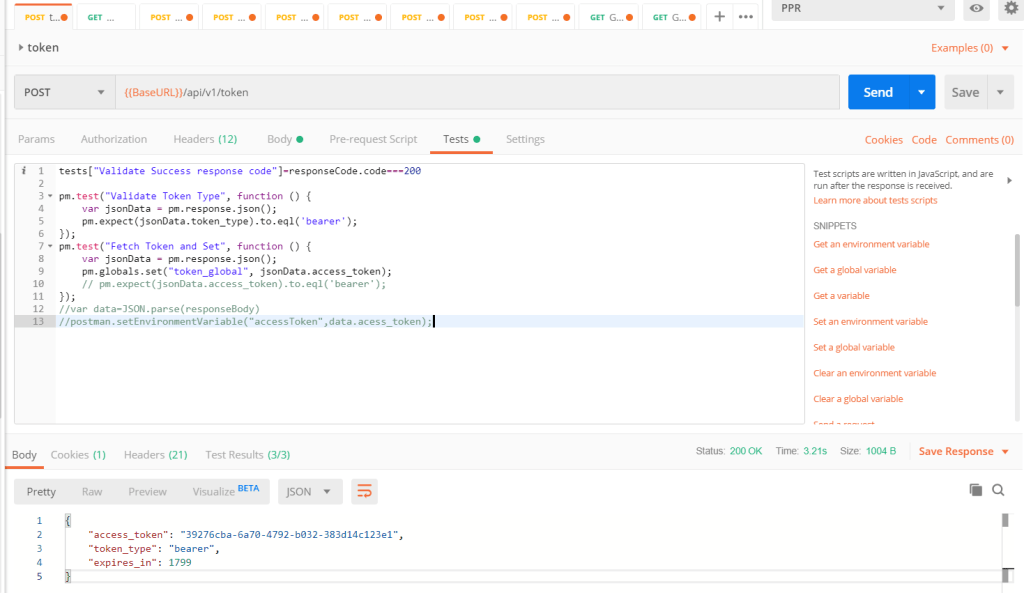
POSTMAN supports javascript based Test scripts where we can write code snippet to do the above.
Use case: 1- Call token endpoint using some valid credentials 2- Get the token from response and store in a variable 3- Use the token variable in another request
pm.test("Fetch Token and Set", function () {
    var jsonData = pm.response.json();
    pm.globals.set("token_global", jsonData.access_token);
   });
The above code can be added in Test tab of POSTMAN. It will store the response in a variable. Then it will extract the value from the key access_token from response and set in the variable token_global * Please note that you need to create a global variable named token_global.
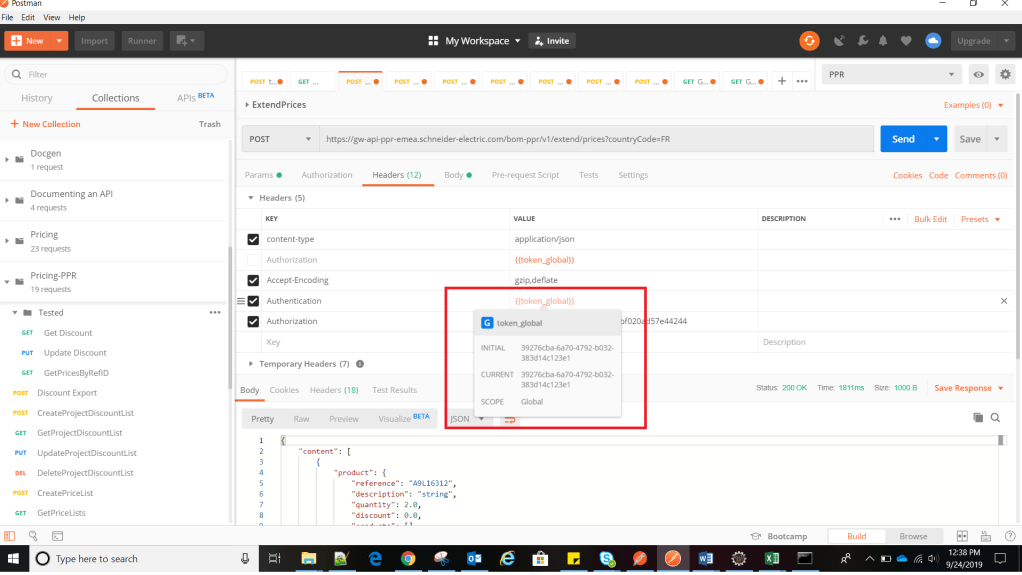
Token EndpointToken from above is used in this request
Notice that the token generated in step 1 is used in step 2. Highlighted the token to show the token value are same.
Many at times we need to use different content types , headers , parameters while working with different API testing. Today i have figured out a way how to send a different content type as x-www-form-urlencoded for a POST request.
For one my project we have to generate access token using content type as x-www-form-urlencoded and I found it difficult to send it from rest assured or Karate code. However it was easy to send the same request using POSTMAN.
Finally after a lot of trial and error and search over google I found a solution.
USE CASE: 1- Make a POST request 2- Set contet-type as x-www-form-urlencoded in Body (Hence there will be no body content for this content type, only it will have related form parameters) 3- Set 3 parameters for the above content-type – grant_type : password – username: abcd – password: abcd
Sample request in POSTMAN
Now I have done the above request using KARATE API as below.
Feature: To test Authentication API using x-www-form-urlencoded
Scenario: Generate access token
	Given url 'https://login-qa.mywebsite.com/api/v1/token'
	And header Content-Type = 'application/x-www-form-urlencoded'
	And form field username = 'user_ppr_test01@yopmail.com'
	And form field password = 'Test@12345'
	And form field grant_type = 'password'
	And request {}
 	When method post
 	Then status 200

Output:
1 < 200
{"access_token":"5bb73fc5-6e69-43b6-931d-eb80c87a2cc9","token_type":"bearer","expires_in":1799}
Setup Proxy(Option 1:Command line): npm config list (This will list the current user config in C:/Users/{UserName}/.npmrc file) Ex: ; userconfig C:UsersSESA550640.npmrc
WebDriver install webdriver-manager status ( Will list the status of WebDrivers)
7.webdriver-manager update It will be installed under below Dir: C:UsersSESA550640AppDataRoamingnpmnode_modulesprotractornode_modules webdriver-manager
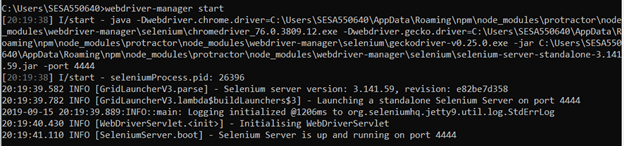
You might get below error due to proxy: Error: connect ETIMEDOUT 172.217.163.80:443 [11:27:15] E/start – Selenium Standalone is not present. Install with webdriver-manager update –standalone
Write a test Open a new command line or terminal window and create a clean folder for testing.
Protractor needs two files to run, a spec file and a configuration file.
To begin with we can copy sample example_spec and conf.js from Protractor installation path. When we install protractor these sample files come along with it. C:UsersusernameAppDataRoamingnpmnode_modulesprotractorexample
or
Create a spec file: firstTest_spec.js
describe('angularjs homepage todo list', function() {
  it('should add a todo', function() {
    browser.get('https://angularjs.org');

    element(by.model('todoList.todoText')).sendKeys('write first protractor test');
    element(by.css('[value="add"]')).click();
var todoList = element.all(by.repeater('todo in todoList.todos'));
    expect(todoList.count()).toEqual(3);
    expect(todoList.get(2).getText()).toEqual('write first protractor test');

    // You wrote your first test, cross it off the list
    todoList.get(2).element(by.css('input')).click();
    var completedAmount = element.all(by.css('.done-true'));
    expect(completedAmount.count()).toEqual(2);
  });
});
The describe and it syntax is from the Jasmine framework. browser is a global created by Protractor, which is used for browser-level commands such as navigation with browser.get.
Now run the test with ( Assuming that both the spec file and conf file are in same location, else provide the absolute path of spec file in conf file. Ex: specs: [‘Testcases//example.js’] or specs: [‘..//Testcases//JasmineFeatures_spec.js’] protractor conf.js
If you get below error: Unable to create new service: ChromeDriverService
Try updating chromedriver :
webdriver-manager update --chromedriver
If you using Visual Studio Code then I recommend installing below plugins: 1- Typescript hero 2- javascript 3- Protractor Test Runner (Enables to run .ts file directly) 4- Since protractor comes with Jasmine out of the box, but if it is installed globally, then VS Code intellisense (code completion) might not work properly. Run below code to enable it. npm i @types/jasmine 5- Gauge ( for writing better reusable code) 6- Cordova ( AI code completion )
I was impressed by the post shared over whatsapp by a friend (Rakesh Bhat – An endurance Runner) of mine and I thought to pin it down here as a post. Most of such great share get lost in chats and we forget the benefit of it. Unless we remember and implement it with practice we never get to have the benefit of such great advice. Credit goes to “Raja Marut” for summarizing it.
Session with”Dr Jack Daniels”
Summarized by Raja Marut
Dr Jack Daniels is Rated as one of the world’s best coaches and is 85 years young man !!
My Friends got an opportunity to attend his session. It was an awsome session . I have tried to write down all that I could remember for the benefit of our group members… However, I might have also missed on many points . Some of the points from my memory are :-
Running efficiency depends on
∆ Breathing efficiency
∆ Economy of strides
∆ Body movement
∆ Weight
∆ VO2 max,
∆ Physiology of the person.
∆ Psychology or mental toughness of a runner.
√ He also said VO2 max is not the whole n only key.
Speed can be increased either by:-
∆ Weight reduction
∆ Or by increasing volume of oxygen intake.
∆ However Weight reduction has a limit. Too much weight reduction is a disaster as muscle mass dwindles . Be careful here .
Sleep and rest are most important. Never compromise on these.
Training for consecutive two days and then resting is preferred over alternate day training. But no harm caused in doing alternate day training . Depends on how your body responds to it .
Rest well rather than over train. Over training always follows the principle of law of diminishing returns.
He also classified running into various alphabets..
*E,M,T,I and R
E run or Easy run : Almost 40% of weekly mileage
M run or Marathon Pace run: Almost 35% of weekly mileage
T run or Lactate Threshold Run: 10% of weekly mileage at 85% of max HR
I run or Interval run: 10% of weekly mileage.(Rest interval should be slightly less than running time. Running time cannot exceed 4 min.)
R run or Repetition Run: 5% of weekly mileage. This is the fastest run, you have to touch max HR. Recovery in this case cannot be same for all and has no fixed formula. It cannot be determined by time but it has to be full recovery. (Thus, running time will be less than resting interval time,)
Hemoglobin should be between 14-16% (for both male and female runners), if less, speed will suffer. An increase of 1% in Hb will give a 40 sec advantage. But If level is more than 16%, the blood tends to be viscous or thick and finds it difficult to transport oxygen. So that’s also not advisable . It hinders running performance .
Speed can be increased by 2×2 breathing. Left and right strides for inhale and left and right strides for exhale. This is the breathing rate.
Daniel said not to waste time on road, instead, it is better to take rest and sleep. If you set on road, define the purpose of that particular run. Accordingly, go for the running drill. Without purpose or goal, RUNNING is of no use if u don’t know your purpose or goal . Each to his own .
Also spoke about the most imp ingredients of running .. motivation, mental strength and most importantly FOCUS.
Above all he said running is a part of life . Don’t give up on your social life because of running . Don’t miss b’days and anniversaries . Don’t stop meeting friend’s because u have a run scheduled. If you do this u defeat the whole purpose of life .
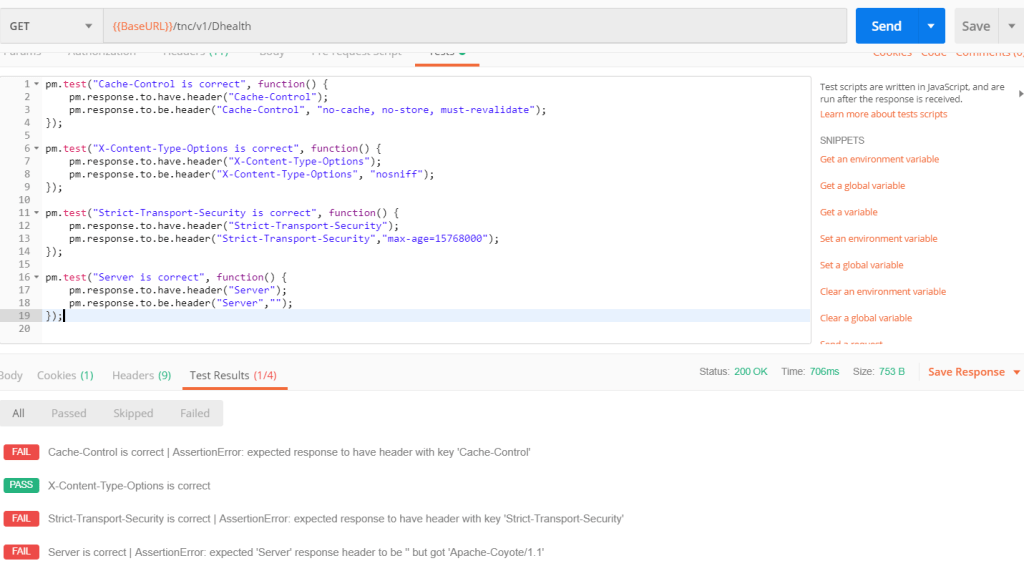
While working with POSTMAN , we need to validate many headers and values as part of API testing. We can validate API response and Headers using javascript under TEST tab. Please note that POSTMAN comes with two variants: 1- Chrome extension (Deprecated but still can be used) 2- Desktop application (Recommended)
We will discuss the examples in both variants.
1- Validate a header has expected value
//POSTMAN Desktop App
pm.test("Cache-Control is correct", function() {
   pm.response.to.be.header("Cache-Control", "no-cache");
});

//POSTMAN - Extension
tests["Cache-Control is correct"] = postman.getResponseHeader("Cache-Control","no-cache");
2- Validate Header is present
//POSTMAN Desktop App
pm.test("Cache-Control is present", function() {
   pm.response.to.have.header("Cache-Control");
});

//POSTMAN - Extension
tests["Cache-Control is present"] = postman.getResponseHeader("Cache-Control");




 TechieWolf