1- Online
https://www.cdn77.com/tls-test
2- Via Python utility
https://www.kitploit.com/2016/03/sslyze-fast-and-full-featured-ssl.html
1- Online
https://www.cdn77.com/tls-test
2- Via Python utility
https://www.kitploit.com/2016/03/sslyze-fast-and-full-featured-ssl.html
While working with extracting data from JSON , we feel the need of expression which helps us to fetch the data from a complex JSON with conditions.
Based on the conditions and logic we provide, it will return the data if the condition matches.
It is indeed very helpful and must have feature in our API testing.
Jayway jsonpath is the best solution this.
Head on to this beautiful website which helps you filter JSON using JsonPath expression:
https://jsonpath.com/?
For more information about the library that we will use here is below:
https://github.com/json-path/JsonPath
Check the instructions on how to implement in your java project.
About the expression:
JSONPath expressions always refer to a JSON structure in the same way as XPath expression are used in combination with an XML document. Since a JSON structure is usually anonymous and doesn’t necessarily have a “root member object” JSONPath assumes the abstract name $ assigned to the outer level object.
JSONPath expressions can use the dot–notation
$.store.book[0].title
or the bracket–notation
$[‘store’][‘book’][0][‘title’]
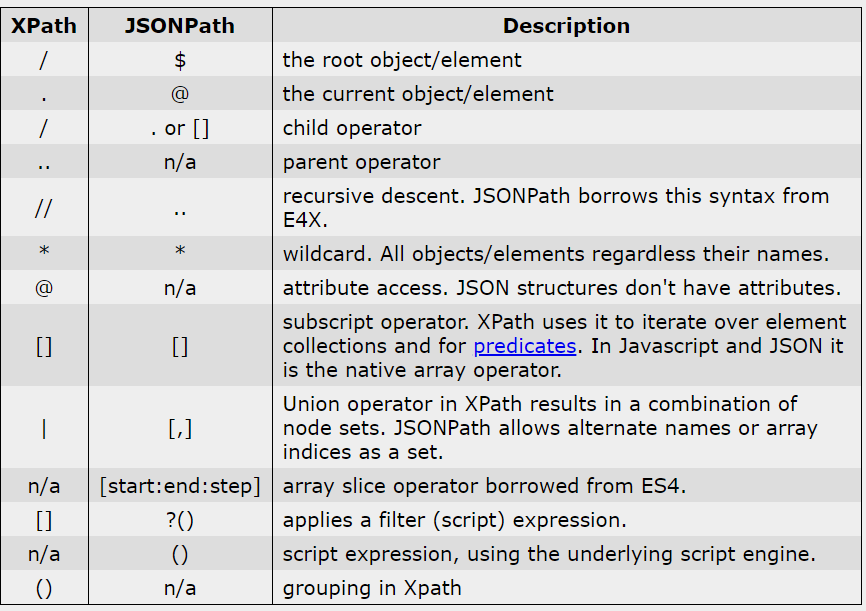
Sample JSON:
use the website with below JSON
https://jsonpath.com
{ "store": {
    "book": [
      { "category": "reference",
        "author": "Nigel Rees",
        "title": "Sayings of the Century",
        "price": 8.95
      },
      { "category": "fiction",
        "author": "Evelyn Waugh",
        "title": "Sword of Honour",
        "price": 12.99
      },
      { "category": "fiction",
        "author": "Herman Melville",
        "title": "Moby Dick",
        "isbn": "0-553-21311-3",
        "price": 8.99
      },
      { "category": "fiction",
        "author": "J. R. R. Tolkien",
        "title": "The Lord of the Rings",
        "isbn": "0-395-19395-8",
        "price": 22.99
      }
    ],
    "bicycle": {
      "color": "red",
      "price": 19.95
    }
  }
}
Below table explains how expression works for above JSON.
| JSON Expression | Usage |
| $.store | To list out all the arrays that comes under store |
| $.store.book | To list all arrays under store –>book |
| $.store.book[1] | To list first array under store –>book |
| $.store.book[?(@.category==’reference’)] | To list all arrays under book having category= reference as value. |
| $.store.book[?(@.category==’fiction’ && @.price==’8.99′)] | To list all arrays under book having category= reference as value and price=8.99. |
For more expressions refer below links.
Credits:
https://goessner.net/articles/JsonPath/index.html#e2
From the title it looks very obvious that java standard input and out is quite a small and basic thing to know. However while solving some basic programs on HackerRank website, I discovered few things which I did not know or ever used. Still good to know it.
Task:
1- Accept an integer from console
2- Accept a string from console
Print
Integer: <input integer>
String: <InputString>
This looks very basic as one would simply write as below:
Scanner sc =new Scanner(System.in);
int i= sc.nextInt();
String s=sc.next();
However the output would be as below:
Console Input:
4
Hello, How are you?
Output:
4
It wont print the string because:
Step1- Enter number in console ( The number is stored in int i)
Step2: User hits Enter key ( next() will read the string till space, i.e Hello,
To implement it we need to use nextLine()
So updated code will be:
int i= sc.nextInt();
String s=sc.nextLine();
But here also there is an issue, since nextLine() will Enter as an input which is empty in this case. So it will not print the string at all.
So we need to skip enter key input as below:
int i=sc.nextInt();
sc.nextLine(); //This will take the Enter key as input
String s=sc.nextLine(); This will print the entire sentence
sc.close();
There many locators in selenium.
Based on scenarios we use one of those.
Here are the list of locators:
id, name , css selector, linkText, partialLinkText, Xpath
Sequence as per the choice of faster execution:
1- id
2- name
3- css
4- xpath
5- linkText
6- partialLinkText
Most widely used locators are xpath and css (If id and name is not present)
Between xpath and CSS, css is more faster and more reliable due to below reasons:
1- xpath has different engines for different browsers, where as CSS is same for all browsers
2- CSS is best suited for IE browser than xpath
3- Xpath can traverse backward/froward direction in DOM elements but css can only find forward direction(disadvantage)
XPATH examples:
1- //div[@class=’somename’]/table/td
2- //a[text()=’sometext’]
3- //table/tr/td/label[contains(.,’sometext’)]
4- //table/tr/td/label[contains(text,’sometext’)]
5- //*[@type=’submit’ or @name=’btnReset’]
6- //input[@type=’submit’ and @name=’btnLogin’]
<bookshelf>
        <book>
                <title>The Great Adventure</title>
                <author>J.K.Miller</author>
                <pages countingCover="true">360</pages>
                <publisher>B and B</publisher>
        </book>
        <book>
                <title>On the Way</title>
                <author>J.Johnson</author>
                <pages countingCover="true">2135</pages>
        </book>
        <book>
                <title>The Silent Rage</title>
                <author>Thomas B.</author>
                <pages countingCover="false">530</pages>
        </book>
</bookshelf>CSS locators:
^ - Starts with
input[id^='cb-select']

$ -  Ends with
input[id$='319']

# id
input#cb-select-319
or
input[id='cb-select-319']

.  class
input.class_name

* contains
input[id*='login']Data Abstraction may also be defined as the process of identifying only the required characteristics of an object ignoring the irrelevant details.The properties and behaviors of an object differentiate it from other objects of similar type and also help in classifying/grouping the objects.
Consider a real-life example of a man driving a car. The man only knows that pressing the accelerators will increase the speed of car or applying brakes will stop the car but he does not know about how on pressing the accelerator the speed is actually increasing, he does not know about the inner mechanism of the car or the implementation of accelerator, brakes etc in the car. This is what abstraction is.
In java, abstraction is achieved by interfaces and abstract classes. We can achieve 100% abstraction using interfaces.
When to use?
There are situations in which we will want to define a superclass that declares the structure of a given abstraction without providing a complete implementation of every method. That is, sometimes we will want to create a superclass that only defines a generalization form that will be shared by all of its subclasses, leaving it to each subclass to fill in the details.
Encapsulation vs Data Abstraction
package com.basic;

public class AbstractionDemo {

	public static void main(String[] args) {
		//Creating object of Men and accessing Men class methods along with Human class methods
		Men m=new Men();
		m.beard();   //Men class method
		m.superman(); //Men class method
		m.walk(); //Human class method but defined in Men class which is abstract
		m.eat(); // Human class method which is concrete method

		// Similarlywith Women class object accesing women class methods and Human class methods
		Women w=new Women();
		w.longHair();
		w.reproduction();
		w.walk();
		w.eat();

		//Human class reference but Men class object
		Human h=new Men();
		h.eat();
		h.walk();

		//Human class reference but Women class object
		Human h2=new Women();
		h2.eat();
		h2.walk();
	}
}

abstract class Human{ //Abstract class with one abstract method

	void eat() {
		System.out.println("Human Eats food");
	}
	//One abstract method with no body, has to be defined in class which extends
	abstract void walk() ;
}

//Men class extends Human so only abstract method must be defined
class Men extends Human{
	void beard() {
		System.out.println("Men has beard");
	}
	void superman() {
		System.out.println("Sumerman is a MAN");
	}
	void walk() {   //This method is abstract in Human so here it must be defined
		System.out.println("WALK: MEN walks fast");
	}
}

//Women class extends Human so only abstract method must be defined
class Women extends Human{
	void longHair() {
		System.out.println("Women have long hair");
	}
	void reproduction() {
		System.out.println("Women can reproduce");
	}
	void walk() {   //This method is abstract in Human so here it must be defined
		System.out.println("WALK: WOMEN walks slow");
	}
}
Credits:
Naveen Reddy (YouTube Channel)
geeksforgeeks.org
Credits:
Naveen reddy (Telusko youtube channel)
http://www.geeksforgeeks.org
Like a class, an interface can have methods and variables, but the methods declared in interface are by default abstract (only method signature, no body).
abstract class random implements testInterface{

	public abstract void something(); //No body with abstract
	public void hello() {
		System.out.println("Hello");
	}
}
//Because one method is abstract, the class must also be abstractImportant points about interface
An example below:
//public class InterfaceDemo extends Pencil { // Extends can happen for only single class, JAVA does not support multiple inheritance
public class InterfaceDemo implements sharpner { // Implements interface now from extending class, implementing sharpner interface which again extends rubber and pencil adv

	public static void main(String[] args) {
		Pen p = new Pen(); // If show method is not static we need to create an object and then we can
							// access pen class
		p.showPen();

		Pencil.showPencil(); // If show method is static , we can access it after extending Pen class

		Pencil pc = new Pencil();
		pc.showPencil(); // Also we can access show by creating object of pencil class
		pc.erase();

		Pencil_advance pa=new InterfaceDemo(); // Reference of interface but object of class, to access the methods of interface
		pa.showPencilAdv();
		pa.eraseAdv();

		// Since there is already InterfaceDemo() object created, we need to cast for another one
		// Since sharpner interface already extends rubber and pencil advance, we can call all methods from pencil adv, rubber, sharpener
		sharpner sh=new InterfaceDemo();
		sh.sharpen();
		sh.EraseRubber();
		sh.showPencilAdv();
		sh.eraseAdv();

	}


	public void showPencilAdv() { 				//Method definition is mandatory if implementing interface
	System.out.println("Show Adv pencil");
	}

	public void eraseAdv() { 						///Method definition is mandatory if implementing interface
		System.out.println("Erase adv pencil");
	}


	public void EraseRubber() {
		// TODO Auto-generated method stub

	}


	public void sharpen() {
		// TODO Auto-generated method stub

	}

}
class Pen {
	void showPen() {
		System.out.println("Pen class_show method");
	}
}
class Pencil {
	static void showPencil() {
		System.out.println("Pencil class_show method");
	}
	void erase() {
		System.out.println("Pencil can erase");
	}
}
//Interfaces with declaration and no definition
interface Pencil_advance {
	void showPencilAdv();
	void eraseAdv();
}
interface rubber{
	void EraseRubber();
}
interface sharpner extends rubber,Pencil_advance{ //Interface extends interface not implements, interface can extend multiple interface
	void sharpen();
}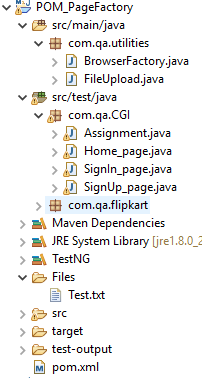
What is POM?
Page factory model is a design pattern to organize test cases and web elements locators separately
All element locators are stored in a class file separately from test cases
What is page class?
It contains element locators
it contains methods related to that page functionality
What is Test case class?
It contains the actual test cases.
It calls the methods from its respective page classes.
What is page factory?
Page factory is a in built class in selenium for maintaining object repository.
iniElement() is used to look up elements in page class and to initialize.
It allows storing elements in cache memory using cachelookup.
POM with out Page factory uses BY, whereas POM with page factory uses FindBy to locate elements.
CacheLookup, is useful to speed up the execution process.
It stores the locators from cache memory and directly use to find the elements. It does not search the locators in DOM during run time.
It should only be used if locators are static and do not change else it will throw stale element error.
Environment setup:
POM.XML
– WebDriver Manager
– TestNG
– Selenium webdriver
<dependencies>
		<!-- https://mvnrepository.com/artifact/org.seleniumhq.selenium/selenium-java -->
		<dependency>
			<groupId>org.seleniumhq.selenium</groupId>
			<artifactId>selenium-java</artifactId>
			<version>3.141.59</version>
		</dependency>
		<dependency>
			<groupId>io.github.bonigarcia</groupId>
			<artifactId>webdrivermanager</artifactId>
			<version>3.6.1</version>
			<scope>test</scope>
		</dependency>
		<dependency>
			<groupId>org.testng</groupId>
			<artifactId>testng</artifactId>
			<version>6.14.3</version>
			<scope>test</scope>
		</dependency>
	</dependencies>
Step1: Create Page class
Ex: Home_page.java
import java.util.List;

import org.openqa.selenium.WebDriver;
import org.openqa.selenium.WebElement;
import org.openqa.selenium.support.FindBy;
import org.openqa.selenium.support.How;
import org.openqa.selenium.support.PageFactory;

public class Home_page {

	WebDriver driver;
	public Home_page(WebDriver Ldriver) {
		this.driver=Ldriver;
	}

	@FindBy(how = How.CSS, using = "#navbar > div.navbar-nav.mr-auto > a:nth-child(2)")
	public WebElement address_menu;

	@FindBy(how = How.XPATH, using = "//a[text()='New Address']")
	public WebElement NewAdd_link;

	@FindBy(how = How.NAME, using = "address[first_name]")
	public WebElement firstName;

	@FindBy(how = How.NAME, using = "address[last_name]")
	public WebElement lastName;

	@FindBy(how = How.NAME, using = "address[address1]")
	public WebElement address1;

	@FindBy(how = How.NAME, using = "address[city]")
	public WebElement city;

	@FindBy(how = How.NAME, using = "address[zip_code]")
	public WebElement zip;

	@FindBy(how = How.ID, using = "address_state")
	public WebElement stateList;

	@FindBy(how = How.ID, using = "address_country_canada")
	public WebElement country_canada;

	@FindBy(how = How.ID, using = "address_birthday")
	public WebElement birthday;

	@FindBy(how = How.ID, using = "address_picture")
	public WebElement picture;

	@FindBy(how = How.NAME, using = "commit")
	public WebElement createAddress;

}
2- Create Test class
Ex: TestHomePage.java
import java.util.List;
import java.util.concurrent.TimeUnit;

import org.openqa.selenium.Alert;
import org.openqa.selenium.By;
import org.openqa.selenium.WebDriver;
import org.openqa.selenium.WebElement;
import org.openqa.selenium.chrome.ChromeDriver;
import org.openqa.selenium.support.PageFactory;
import org.openqa.selenium.support.ui.Select;
import org.testng.annotations.AfterClass;
import org.testng.annotations.BeforeClass;
import org.testng.annotations.Test;

import io.github.bonigarcia.wdm.WebDriverManager;

public class Assignment {

	private static WebDriver driver;

	@BeforeClass
	public static void setupClass() {
		WebDriverManager.chromedriver().setup();
		driver = new ChromeDriver();
	}

	@Test
	public void TC01() {
		String appURL = "http://a.testaddressbook.com/sign_up";

		// Navigating to the Application URL
		driver.get(appURL);
		driver.manage().timeouts().implicitlyWait(20, TimeUnit.SECONDS);
		SignUp_page signupPage = PageFactory.initElements(driver, SignUp_page.class);

		signupPage.email_txt.sendKeys("Your_Name@abc.com");
		signupPage.password_txt.sendKeys("admin");
	}

	@Test
	public void TC02() {
		String appURL = "http://a.testaddressbook.com/sign_in";

		// Navigating to the Application URL
		driver.get(appURL);
		driver.manage().timeouts().implicitlyWait(20, TimeUnit.SECONDS);
		SignIn_page signinPage = PageFactory.initElements(driver, SignIn_page.class);
//		Home_page homePage = PageFactory.initElements(driver, Home_page.class);
		Home_page homePage = new Home_page(driver);
		PageFactory.initElements(driver, Home_page.class);

		signinPage.email_txt.sendKeys("test@xyz.com");
		signinPage.password_txt.sendKeys("test");
		signinPage.signIn_btn.click();

		homePage.address_menu.click();
		homePage.NewAdd_link.click();
		String firstname = "Test Name1";
		homePage.firstName.sendKeys(firstname);
		homePage.lastName.sendKeys("Test Name");
		homePage.address1.sendKeys("add1");
		homePage.city.sendKeys("City");
		homePage.zip.sendKeys("45454");
		Select dropdown = new Select(homePage.stateList);
		dropdown.selectByVisibleText("Idaho");
		homePage.country_canada.click();
		homePage.birthday.sendKeys("30-04-1987");
		homePage.picture.sendKeys("C:\Users\Wildwolf\eclipse-workspace\POM_PageFactory\Files\Test.txt");
		homePage.createAddress.click();

		homePage.address_menu.click();
		driver.findElement(By.xpath("//tbody/tr[contains(.,'" + firstname + "')]/td/a[text()='Destroy']")).click();
		Alert alert = driver.switchTo().alert();
		alert.accept();

	}

	// @AfterClass
	public void teardown() {
		if (driver != null) {
			driver.quit();
		}
	}
}
3- Create a generic class for browser driver
This will take browser name , URL and return the driver
import org.openqa.selenium.WebDriver;
import org.openqa.selenium.chrome.ChromeDriver;
import org.openqa.selenium.firefox.FirefoxDriver;

public class BrowserFactory {

	/**
	 * This class is to initialize and setup browser before execution
	 */

	static WebDriver driver;

	public static WebDriver startBrowser(String browser,String appURL) {

		if(browser.equalsIgnoreCase("chrome")) {
			driver=new ChromeDriver();

		}
		else if(browser.equalsIgnoreCase("firefox")) {
			driver=new FirefoxDriver();
		}
		else {
			System.out.println("Invalid browser name!");
		}

		driver.manage().window().maximize();
		driver.get(appURL);

		return driver;
	}
}WebDriverManager allows to automate the management of the binary drivers (e.g. chromedriver, geckodriver, etc.) required by Selenium WebDriver.
If you use Selenium WebDriver, you will know that in order to use some browsers such as Chrome, Firefox, Opera, PhantomJS, Microsoft Edge, or Internet Explorer, first you need to download a binary file which allows WebDriver to handle browsers. In Java, the path to this binary must be set as JVM properties, as follows:
System.setProperty("webdriver.chrome.driver", "/path/to/binary/chromedriver");
 System.setProperty("webdriver.gecko.driver", "/path/to/binary/geckodriver");
 System.setProperty("webdriver.opera.driver", "/path/to/binary/operadriver");
 System.setProperty("phantomjs.binary.path", "/path/to/binary/phantomjs");
 System.setProperty("webdriver.edge.driver", "C:/path/to/binary/msedgedriver.exe");
 System.setProperty("webdriver.ie.driver", "C:/path/to/binary/IEDriverServer.exe");
This is quite annoying since it forces you to link directly this binary file into your source code. In addition, you have to check manually when new versions of the binaries are released. WebDriverManager comes to the rescue, performing in an automated way all this dirty job for you. WebDriverManager can be used in 3 different ways:
This is quite annoying since it forces you to link directly this binary file into your source code. In addition, you have to check manually when new versions of the binaries are released. WebDriverManager comes to the rescue, performing in an automated way all this dirty job for you. WebDriverManager can be used in 3 different ways:
WebDriverManager as Java dependency
In order to use WebDriverManager from tests in a Maven project, you need to add the following dependency in your pom.xml (Java 8 or upper required):
<dependency>
    <groupId>io.github.bonigarcia</groupId>
    <artifactId>webdrivermanager</artifactId>
    <version>3.6.1</version>
    <scope>test</scope>
</dependency>
Example:
public class ChromeTest {
private WebDriver driver;

@BeforeClass
public static void setupClass() {
    WebDriverManager.chromedriver().setup();
}

@Before
public void setupTest() {
    driver = new ChromeDriver();
}

@After
public void teardown() {
    if (driver != null) {
        driver.quit();
    }
}

@Test
public void test() {
    // Your test code here
}
}Credit: kirsty bonner
 TechieWolf