
Posted in Automation Testing

Git and Github

What is GIT?
Git is an open-source version control system that was started by Linus Trovalds—the same person who created Linux. Git is similar to other version control systems—Subversion, CVS, and Mercurial to name a few.

What is Github?
GitHub, a subsidiary of Microsoft, is an American web-based hosting service for version control using Git.
The social networking aspect of GitHub is probably its most powerful feature, allowing projects to grow more than just about any of the other features offered. Each user on GitHub has their own profile that acts like a resume of sorts, showing your past work and contributions to other projects via pull requests.

Git Tutorial – Operations & Commands
Some of the basic operations in Git are:

  • Initialize
  • Add
  • Commit
  • Pull
  • Push

Some advanced Git operations are:

  • Branching
  • Merging
  • Rebasing

A brief idea about how these operations work with the Git repositories. Take a look at the architecture of Git below:
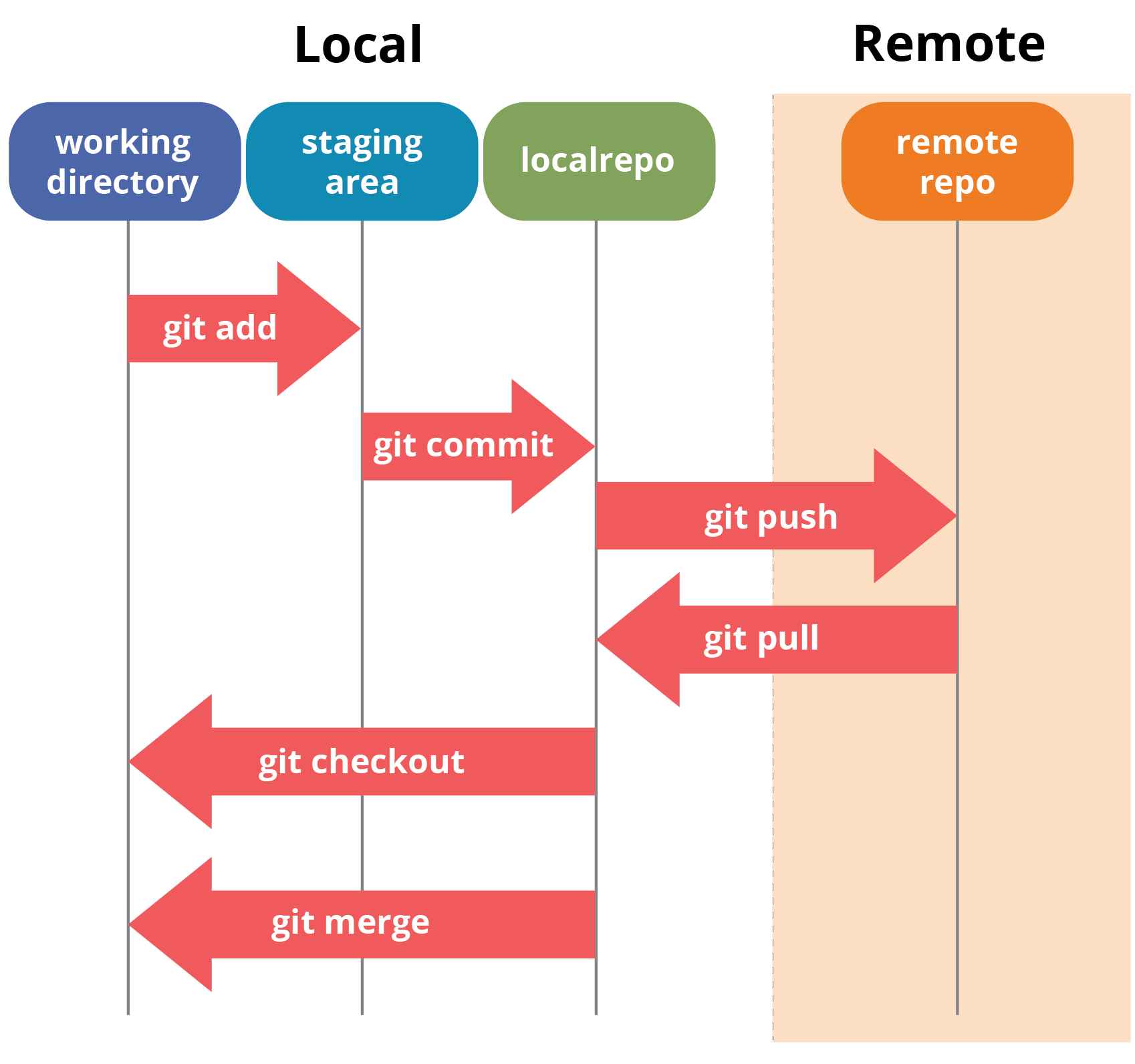
Git Architechture - Git Tutorial - Edureka
Source: Edureka website

Initialize
In order to do that, we use the command git init. Please refer to the below screenshot.
# git init

Git status
The git status command lists all the modified files which are ready to be added to the local repository.
# git status

Add
This command updates the index using the current content found in the working tree and then prepares the content in the staging area for the next commit.
# git add <dir> or # git add <filename> or # git add -A (to add all files)

Commit
It refers to recording snapshots of the repository at a given time. Committed snapshots will never change unless done explicitly.
# git commit -m “some message”

Set your central repository as origin using the command:
# git remote add origin <link of your central repo>

# git pull origin master
This command will copy all the files from the master branch of remote repository to your local repository.
# git pull origin <branch name>

# git push <remote repo>
Note : This remote refers to the remote repository which had been set before using the pull command.

Branching
Branches in Git are nothing but pointers to a specific commit. Git generally prefers to keep its branches as lightweight as possible.
There are basically two types of branches viz. local branches and remote tracking branches.
To create branch
# git branch <branch name>
To switch branch:
# git checkout <branch name>

Merging
Merging is the way to combine the work of different branches together. This will allow us to branch off, develop a new feature, and then combine it back in.
# git merge <destination branch name>

It is important to know that the branch name in the above command should be the branch you want to merge into the branch you are currently checking out. So, make sure that you are checked out in the destination branch.

Rebasing
This is also a way of combining the work between different branches. Rebasing takes a set of commits, copies them and stores them outside your repository.

The advantage of rebasing is that it can be used to make linear sequence of commits. The commit log or history of the repository stays clean if rebasing is done.
# git rebase master

Few other commands:
To view commit logs
# git log

To configure profile:
# git config –global user.email “avishekbehera87@gmail.com”
# git config –global user.name”avishek behera”

Sources:
https://www.howtogeek.com/180167/htg-explains-what-is-github-and-what-do-geeks-use-it-for/
https://www.edureka.co/blog/git-tutorial/

Posted in Others

variable-length arguments in Java

Prior to JDK 5, variable-length arguments could be handled two ways. One using overloaded method(one for each) and another put the arguments into an array, and then pass this array to the method. Both of them are potentially error-prone and require more code. The varargs feature offers a simpler, better option.

Syntax of varargs :
A variable-length argument is specified by three periods(…). For Example:

public static void fun(int ... a) 
{
   // method body
}

This syntax tells the compiler that fun( ) can be called with zero or more arguments. As a result, here a is implicitly declared as an array of type int[].

// Java program to demonstrate varargs 
class Test1 
{ 
    // A method that takes variable number of intger 
    // arguments. 
    static void fun(int ...a) 
    { 
        System.out.println("Number of arguments: " + a.length); 
  
        // using for each loop to display contents of a 
        for (int i: a) 
            System.out.print(i + " "); 
        System.out.println(); 
    } 
  
    // Driver code 
    public static void main(String args[]) 
    { 
        // Calling the varargs method with different number 
        // of parameters 
        fun(100);         // one parameter 
        fun(1, 2, 3, 4);  // four parameters 
        fun();            // no parameter 
    } 
}

}
Output:

Number of arguments: 1
100 
Number of arguments: 4
1 2 3 4 
Number of arguments: 0
 

Explanation of above program :

  • The … syntax tells the compiler that varargs has been used and these arguments should be stored in the array referred to by a.
  • The variable a is operated on as an array. In this case, we have defined the data type of a as int. So it can take only integer values. The number of arguments can be found out using a.length, the way we find the length of an array in Java.

    Note: A method can have variable length parameters with other parameters too, but one should ensure that there exists only one varargs parameter that should be written last in the parameter list of the method declaration.

    int nums(int a, float b, double … c)

Important points:

  • Vararg Methods can also be overloaded but overloading may lead to ambiguity.
  • Prior to JDK 5, variable length arguments could be handled into two ways : One was using overloading, other was using array argument.
  • There can be only one variable argument in a method.
  • Variable argument (varargs) must be the last argument.

Source: https://www.geeksforgeeks.org/variable-arguments-varargs-in-java/

Posted in Manual Testing

Job interview tips: 1

If you are going to MESS UP at Interview, don’t let it be for one of these reasons!

7 Basic INTERVIEW Mistakes:

I have made a few in my time!
Which ones are YOU guilty of?

  1. Arriving late.
  2. Inappropriately dressed.
  3. Unfamiliar with your own CV/Resume content.
  4. Only skimmed through the job description and requirements.
  5. Haven’t thoroughly researched ALL aspects and angles of the company.
  6. Over-caffeinated.
  7. Haven’t switched your cell phone off.

Why is it important NOT to make these mistakes?
Because…..
You will have messed it up, before they even ask you a single question!

The solution?

BE WELL-PREPARED!
You got the chance to interview! Don’t risk a job because you failed to pay attention to the little, but very important details!

When opportunity knocks, be ready to open the door!
Do you agree?

Credit: Kirsty Bonner (LinkedIn)
KB #jobseekers #oleg
Follow these INTERESTING people:
Oleg Adam Ahmad Anthony Ash

Posted in Others

JDK, JRE, JVM

JDK
Contains various APIs and libs like
Java.io, javac, java etc
It gives the required packages for java developer to work on JVM and jre

JRE
It is runtime environment, which implements JVM and provides all class libraries and other files that JVM requires at runtime

JVM
It is where the bytecode is executed

Posted in Others

Synchronisation in Java

  • It is a process which keeps all concurrent threads in execution to be in sync while trying to access the same object at the same time.
  • It prevents memory consistency errors caused due to inconsistent view of shared memory.
  • Ex BookMyShow, multiple users try to book tickets at same time but ticket selected by one user is Locked and prevented for other users.
Posted in Others

Process vs thread

  • A process is a running instance of program over OS
  • – A thread is running on top of process
  • – OS, there is multi processing on OS level
  • – Multiple thread, multi threading in process level
  • – Process run on separate memory space
  • – Thread runs on shared memory space
Posted in Others

Wrapper class in Java

– Each of java’s 8 primitive data types has a class dedicated to it. These are known as wrapper class
– They wrap the primitive data type into an object of that class
– Ex- boolean has Boolean, byte has Byte etc
– int is single value container , primitive data type
– Integer iRef = new Integer(i)- it is wrapper class and called and Boxed(constructing object)
– int j=iRef.intValue() – This is Unboxing (Extracting value from object)
– Integer kRef=i; //It is called Autoboxing, no need to write new keyword

Posted in Others

final, finally, finalize

  • Final is used to apply restrictions on class, method,variable
  • Final class can not be inherited, final method can not be over ridden, final variable can not be changed
  • Finally is used mostly with try catch in exception handling
  • it is used to execute the code which needs to be executed irrespective of the exception
  • Ex , closing db connection
  • finalize is used to clean up processing before object is garbage collector
Posted in Automation Testing

BDD: Cucumber / Gherkin – Preventing feature file proliferation

GENERIC GHERKIN SCENARIO

Feature: App log in

Scenario: User can log in with valid credentials
Given the user is on the log in screen
When the user attempts to log in with valid credentials
Then the user can log in

Note that there’s no detail in here about hard coded credentials, which fields credentials should go in or which buttons should get tapped etc . It’s a behavioural test and currently holds true for all our apps where there is a log facility.

Step definitions for App1

step(“the user is on the log in screen”) {
Launch app
Assert user is on log in screen
}

step(“the user attempts to log in with valid credentials”) {
Fill in these fields to log into App1
Tap login button
}

step(“the user can log in”) {
Assert user is now on correct post login landing page
}

Step definitions for App2

step(“the user is on the log in screen”) {
Launch app
Assert user is on log in screen
}

step(“the user attempts to log in with valid credentials”) {
Fill a whole set of different fields to log into App2
Tap login button
}

step(“the user can log in”) {
Assert user is now on correct post login landing page
}

  1. Gherkin is fine as it helps understand the user story and adds acceptance criteria.
    The definition of acceptance criteria through gherkin is a key feature. Otherwise it is hard to track test coverage and test ability. Especially in Agile Teams Gherkin and BDD is helpful as User Story’s tend to have too much room for interpretation.
  2. You could use Scenario Outlines to define the Test Environments to handle duplicated Scenarios.
  3. Write one Test for login with a paramterized target environment.
    Data driven parts (data tables) or scenario outlines are the only way to handle this in Gherkin itself.

Reference: https://club.ministryoftesting.com/t/cucumber-gherkin-preventing-feature-file-proliferation/23596/4